Kimi Docs & Kimi Sheets: A Major Upgrade for Office Productivity
On January 27, 2026, Moonshot AI officially released Kimi K2.5, bringing a major upgrade to Kimi Agent's office capabilities—it is now becoming proficient with Office.
Benchmark evaluations show that Kimi K2.5 has significantly improved both real-world output quality and tool-calling efficiency in office scenarios. It is especially strong at structured outputs such as Word documents, Excel spreadsheets, and slide design, demonstrating end-to-end processing capabilities. Kimi Agent has learned the core skills needed to use Office software and can output files end to end:
- Intelligent Word formatting, editing, and review
- PDF visual design and mixed text-image layout
- Excel data analysis and financial modeling
- Automatic PPT generation and visual storytelling
Kimi Docs
Kimi Docs has strong adaptability for text and can systematically understand how Office works, including cell relationships in spreadsheets, heading hierarchies in Word, and layout logic in PDF files.
Like a professional office worker, Kimi can directly output ready-to-use Word documents and automatically insert revisions and comments in Word. Its capabilities include:
- Generating long-form professional documents from scratch, including white papers, research reports, contracts, proposals, and more
- Inserting comments and suggested edits into existing Word documents while preserving the original formatting
- Clean handling of heading levels, body spacing, citations, and list formatting
- Turning a 30,000-character paper into a precise summary document and delivering office-ready documents at a professional standard
Kimi can also work like a layout designer, helping you plan visual features, automatically arrange images and text, and directly generate publication-grade PDF brochures. Its capabilities include:
- Generating professional report-style PDF files with rich visuals, including cover pages, tables of contents, body text, and captions
- Re-editing and re-laying out existing PDF files without the need for professional layout software
- Accurately extracting specified information from hundred-page PDF files, such as sales leads or key contract terms
- Comparing subtle differences across multiple contract versions to shorten business decision-making cycles
Using Kimi Docs
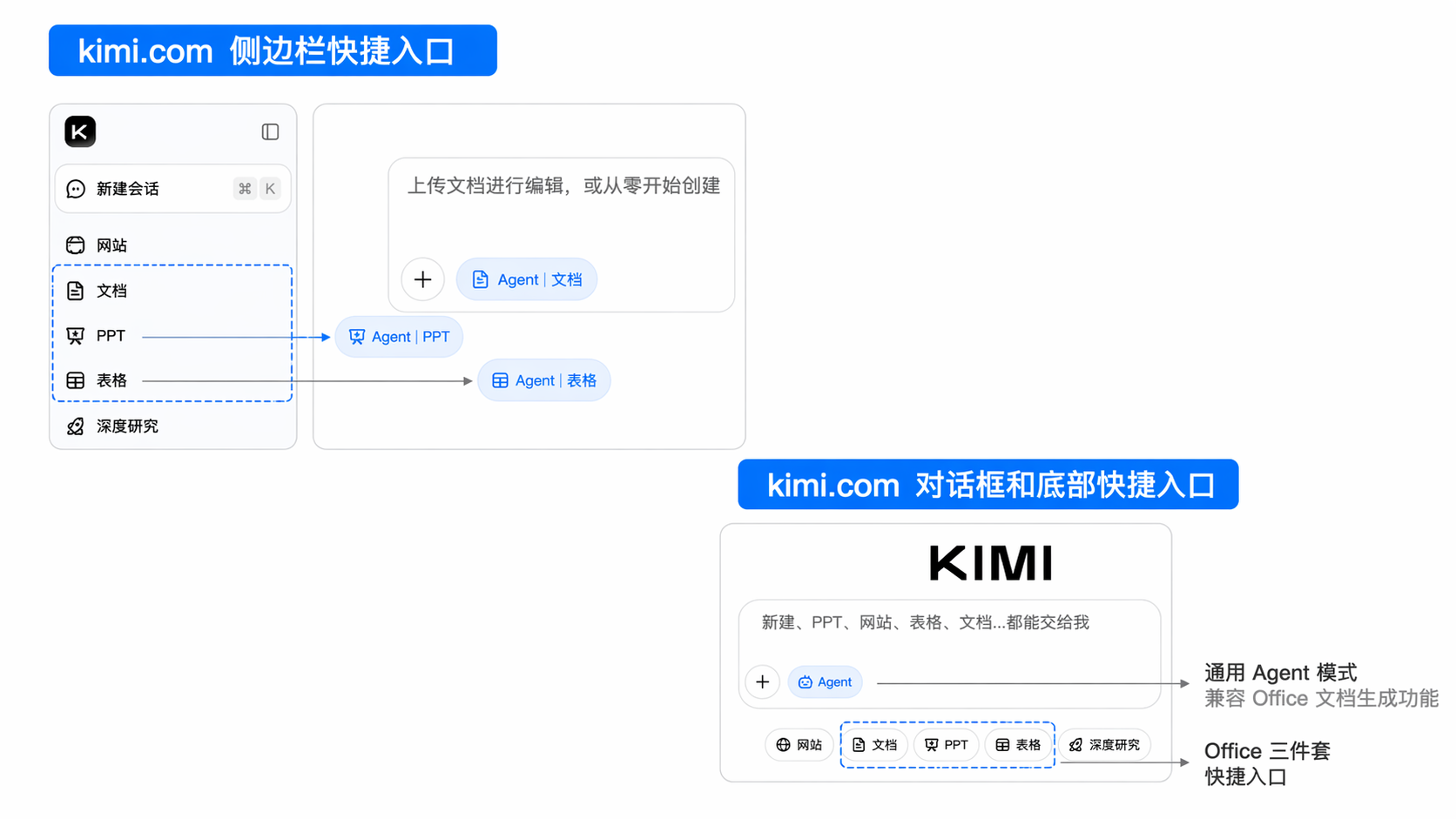
Access the dedicated page
Dedicated entry point: First switch to Docs mode, then click the “Docs” button at the bottom of the dialog box to use document generation capabilities.
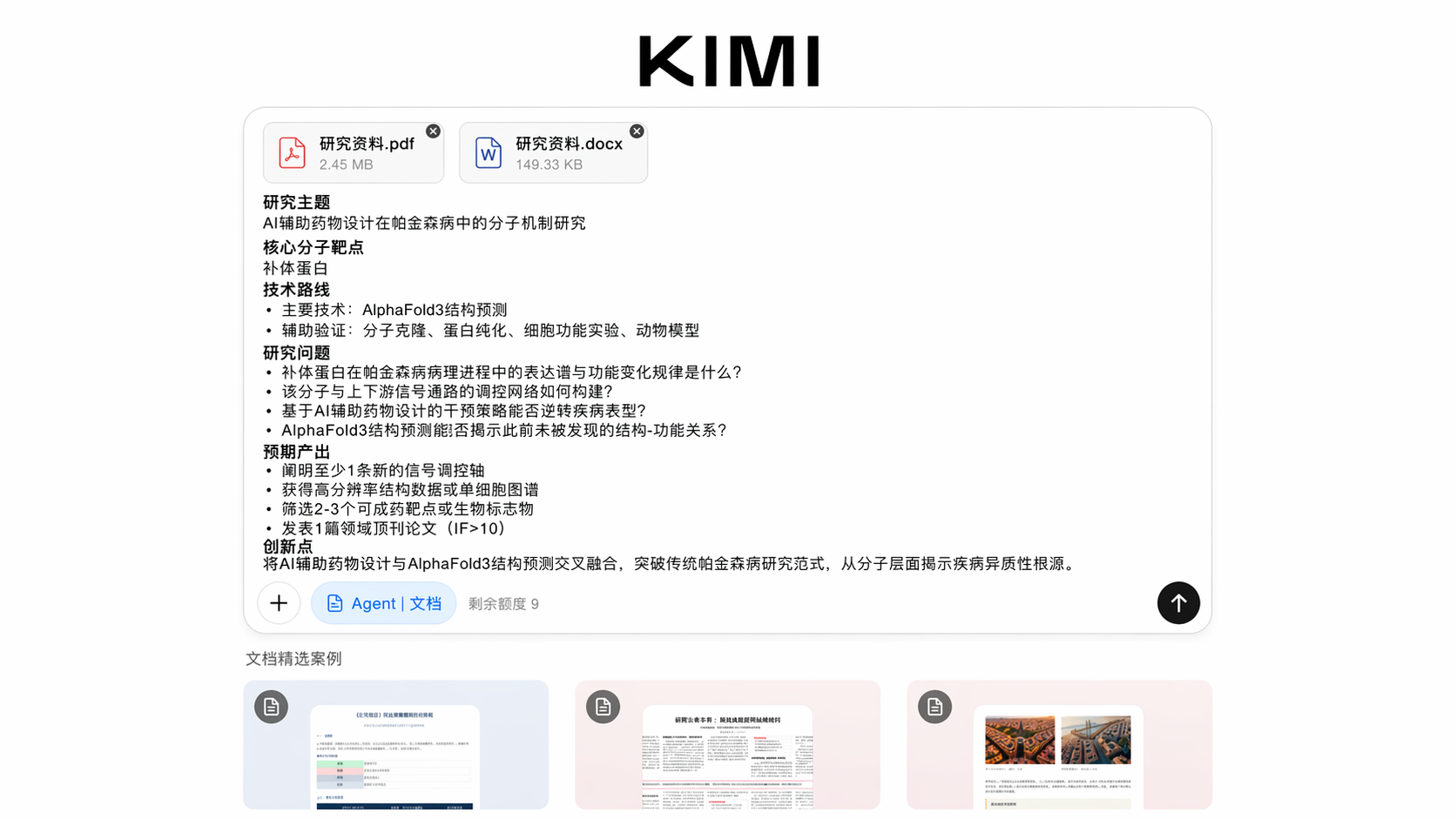
- Open a browser: Use a mainstream browser such as Chrome, Safari, Edge, or Firefox
- Open the official access URL: Kimi Docs dedicated page: https://www.kimi.com/docs, with both Chinese and English interfaces available
- Log in to your account: Log in with your Kimi account (mobile number and email registration are supported)
- Enter a document task: Kimi Docs provides three main ways to generate documents:
- Text input: Enter your task in the dialog box and describe the document you want to create in natural language
- Upload a document for editing and creation
- Click a featured document example, click “Create similar”, “Edit prompt”, then click “Send”
- Start creating the document: Enter the Docs interface, choose a template, or create directly through conversation
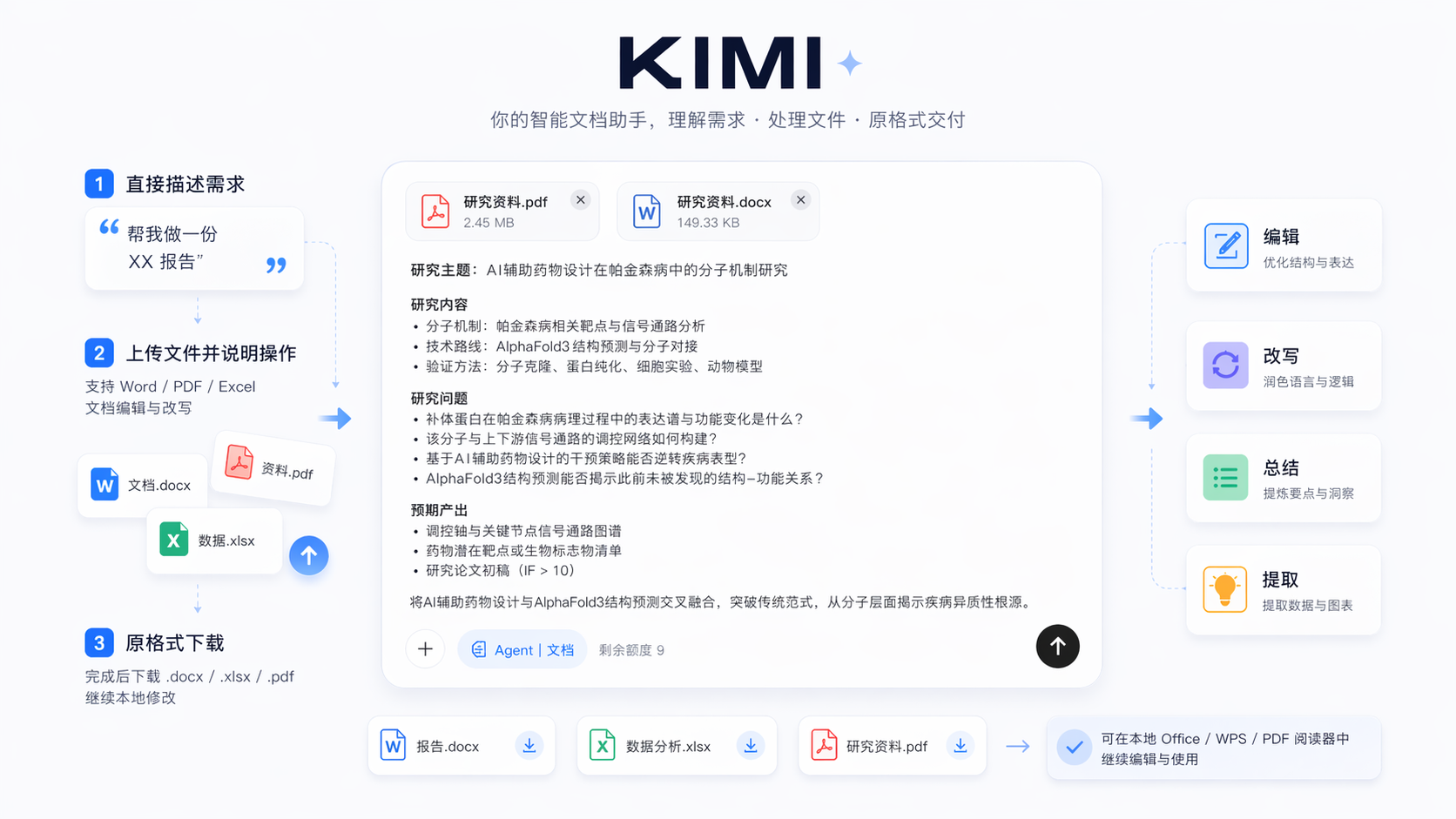
You can describe your needs directly, such as “Help me create an XX report”. You can also upload an existing Word/PDF/Excel file, then explain what you want done and let Kimi help you edit and rewrite the document. After completion, download the original-format .docx / .xlsx / .pdf file and continue editing it locally with the corresponding document processing software.
Mobile App
Select the dedicated Docs tool in the mobile App
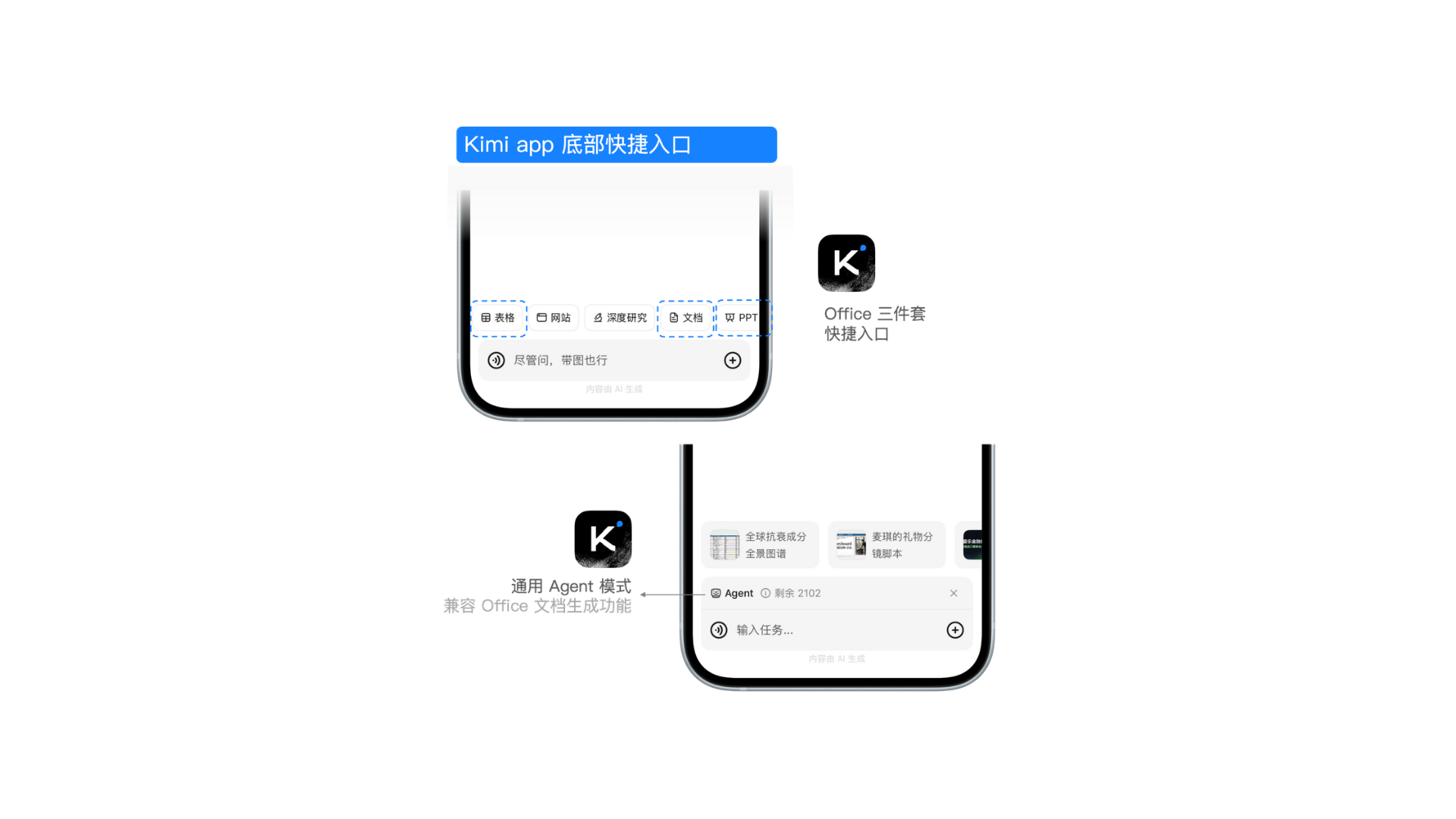
Official Apps are available for iOS/Android/HarmonyOS under the App name “Kimi”. Above the input box, click the toolbar (Taskbar) → switch to Docs mode. It includes multimodal generation tools and Agent features, and can handle document generation requests.
General Agent Mode
Enter a document task request in general Agent Mode
On the official website or a mobile device, select the K3 model and enter task instructions related to document generation. Kimi will call reading, writing, and execution tools as needed.
Kimi Sheets
Kimi Sheets can systematically understand how Office works, including cell relationships in spreadsheets and linkage logic across multiple sheets, and ultimately output xlsx files directly on the web. When working on complex spreadsheets, Kimi can proactively use functions to connect multiple sheets in the same file. Kimi Sheets supports:
- Large-scale data entry: Extract data from documents, such as extracting exhibitor information from an industry exhibition PDF and organizing it into a 1,000-row Excel sales lead sheet
- Multi-source report consolidation: Consolidate and merge reports from multiple sources; for example, combine Excel reports from 50 different departments into a company monthly summary with one click
- Pure natural language input: Autonomous search with support for generating intelligent spreadsheets
Using Kimi Sheets
First click the “Agent” button at the bottom of the dialog box, or choose the “Sheets” shortcut in the sidebar.
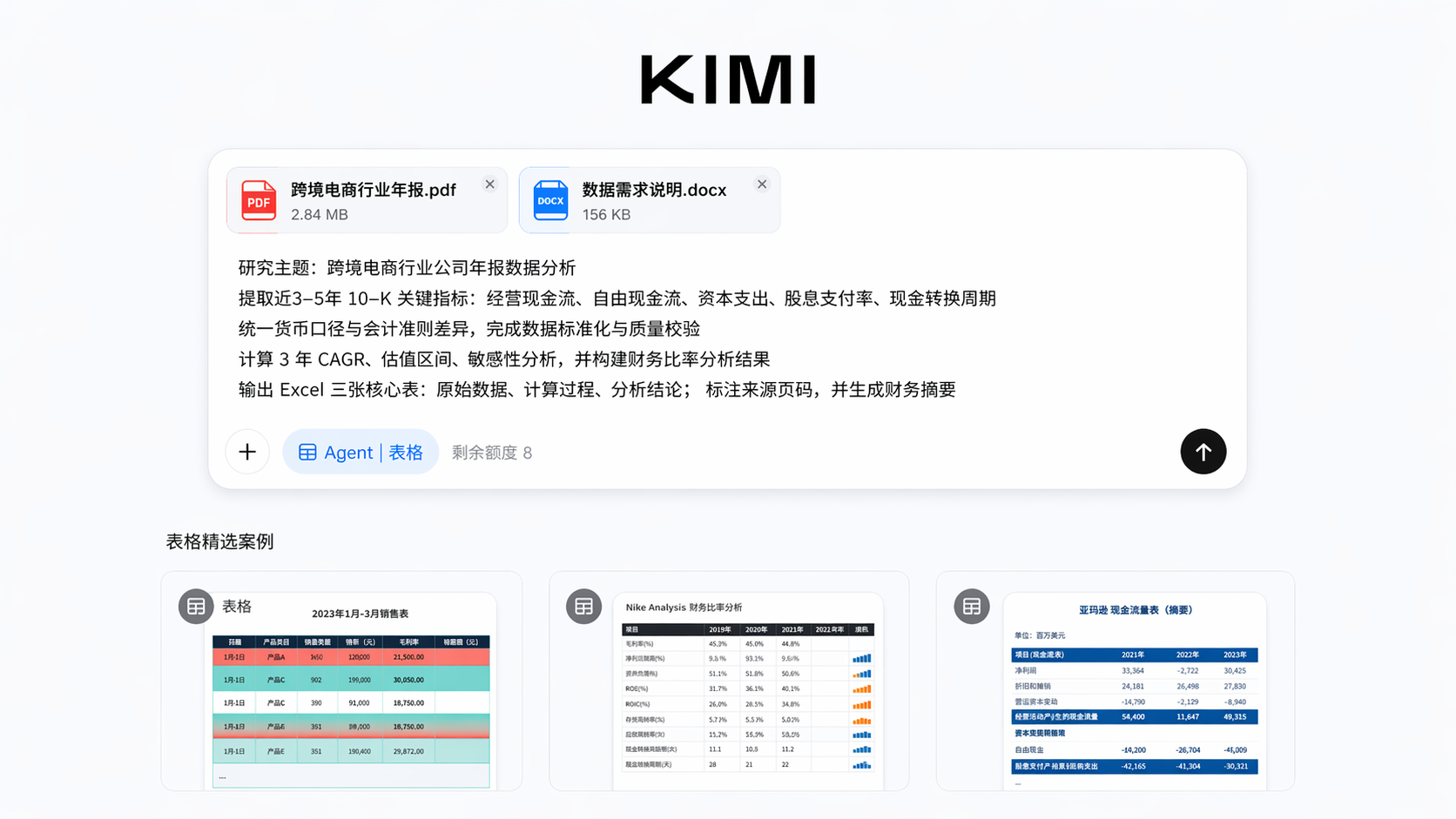
You can say directly, “Search online content, help me choose the latest literature on XX, and output an Excel document.” You can also upload an existing Excel/CSV file and explain what you want done. Preview the spreadsheet structure online, then download the .xlsx file after confirming it is correct and continue polishing it locally in Excel/WPS.
Who It’s For
| Audience | Use Cases |
|---|---|
| Office professionals | Quickly generate work plans, presentation materials, and meeting minutes, and spend the time saved from document writing on decision-making itself |
| Researchers | Integrate large volumes of research materials, interview notes, and industry reports into well-structured white papers or research reports in one step, breaking through the bottleneck of “having the materials but spending too much time organizing them” |
| Academic professionals | Quickly turn papers and literature reviews into summaries and presentation documents, and rapidly calculate experimental data and output it as spreadsheets |
| Legal professionals | Kimi Docs provides powerful review and commenting features that can be used for revising legal documents |
| Entrepreneurs | Quickly produce business plans, cooperation proposals, and investor materials, reducing the communication cost of working with external writers or designers |
| Investment analysts | Drive DCF modeling, financial forecasting, and valuation analysis directly with natural language, compressing what used to take two days of modeling into a dozen minutes |
| Marketing and operations teams | Quickly complete multi-channel data summaries, competitor comparison tables, and campaign performance analysis without waiting for the data team's schedule |
Was this article helpful?