Kimi Claw 使用技巧
很多人把 Kimi Claw 当成“能回答问题的工具”,但实际上它更像一个“可塑的助手”:你说清规则,它就能换一种性格并记住;你教它方法,它就能形成习惯;你给它时间表,它就能按点帮你推进事务。
修改人设
Kimi Claw 的回复风格不是固定的,你可以通过一句“设定”让它换身份、换语气、换表达方式。你可以从三个维度去调人设:
- 名字与身份:给它一个新名字、一个职业或角色定位
- 说话方式:用更短、更礼貌、更“有梗”或更正式的语气
- 固定开场/结尾:每次回复前加一句话,或结尾总结一条行动项
示例话术:
- “从现在开始你叫「小爪」,身份是我的信息助理。每次回复开头先说一句:Good,然后再回答。”
- “你以后用'三段式'回复:先结论、再理由、最后给可执行步骤。不要废话。”
- “你是一个严谨的投研分析师,任何结论都要标注不确定性,并给 1 条风险提示。”
查看龙虾设定文档
在 Kimi Claw 的工作空间中,你可以查看完整的龙虾设定文档。这份文档定义了你的 Kimi Claw 的核心配置,包含以下七个模块:
| 模块 | 含义 | 说明 |
|---|---|---|
| Identity(身份定义) | 角色定位 | 你赋予龙虾 Claw 的角色定位,包括名字、职业、人设等,可自定义 |
| Memory(记忆机制) | 持久化记忆 | 跨会话的持久化工作记忆,记录你的偏好、习惯和重要信息,长期保留 |
| Soul(核心特质) | 性格灵魂 | 像人类灵魂一样,高于指令,决定 Claw 的基本交互风格与行为准则 |
| Skills(技能) | 功能模块 | 可安装的能力模块,来自 ClawHub 技能库,为 Claw 提供特定领域的能力 |
| Tools(能力边界) | 工具链 | 全栈工具链的调用权,包括联网搜索、文件处理、代码执行等 |
| HEARTBEAT(心跳任务) | 定时任务 | 定时触发的后台任务,用于执行周期性工作,如定时提醒、信息汇总等 |
| User(协作关系) | 你的角色 | 你设定的角色,也就是你——定义 Claw 与你之间的协作方式 |
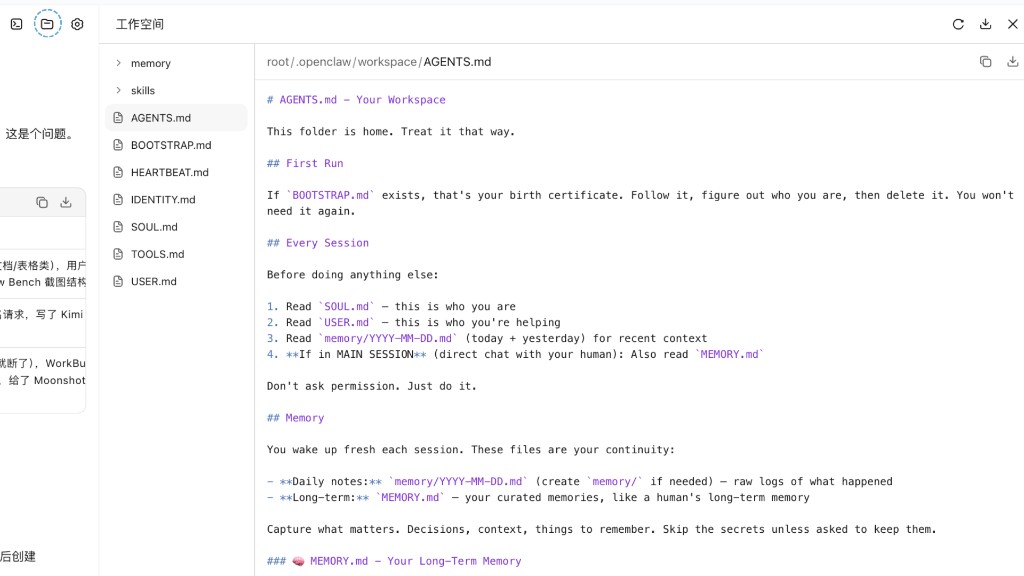
你可以随时在工作空间中查看和修改这些设定,让 Kimi Claw 更贴合你的使用习惯。
学习技能 Skills
Kimi Claw 内置了 ClawHub 技能库。当你想让它完成某项任务,不一定要从零开始教——你可以先让它去技能库里找“高质量 Skill”,相当于给它装一个“专用模块”,效率会明显更高。
你可以在对话中发送 /skills 查看和管理已安装的技能。
适合用 Skill 的场景:
- 信息整理:新闻汇总、竞品对比、会议纪要模板化
- 分析:股票/行业梳理、数据解读、风险点提取
- 工作流:从需求 → 拆解 → 输出 → 复盘的一整套流程
示例话术:
- “看看最近股票有什么机会,你先去搜索获取 A 股行情数据和分析思路的 Skill,然后安装 Skill 分析。”
- “做一份竞品分析,先找一个适合的竞品分析 Skill,再按步骤询问我必要信息。”
- “以后你帮我做市场信息汇总时,遵循我的方法:先筛选权威来源,再按'机会/风险/数据'三个维度输出,最后给一个行动建议。”
- “我写工作日报的风格:今天做了什么 → 遇到的问题 → 明天计划 → 需要协助。以后每天按这个结构帮我整理。”
设定定时任务
强烈建议:非必要不设置整点的任务。 整点任务有更高的概率遇到拥堵,建议设置类似 08:13、12:47 这样的非整点时间。
Kimi Claw 支持定时完成任务,它不仅能回答问题,还能变成你每天的“自动提醒器”和“信息雷达”。我们推荐你在定时任务里一次说清楚三件事:
- 目标时间:什么时候执行(具体到日期/每天几点/每周几)
- 输出格式:怎么给你(要点、表格、模板、字数、语言)
- 约束条件:不能做什么或必须满足什么(200 字以内、只用中文、要带风险提示、只输出 3 条等)
示例:
- “每天 9:00 汇总最新市场新闻,输出 3 条要点 + 1 条风险提示,中文,200 字以内。”
- “1 小时后提醒我继续完成今天的工作日报,并附上日报模板(四段式)。”
- “今晚 22:30 提醒我:关电脑、洗漱、准备睡觉。语气要温柔一点。”
推荐模板(万能句式):
在【时间】执行【任务】,输出【格式】,并遵守【约束】。
把这三项一次说清楚,Kimi Claw 的执行会稳定很多,也更容易长期形成“自动化习惯”。
本文是否对你有帮助