Kimi Business 常见问题
Kimi Business 适合什么样的团队?
适合有团队协作需求的中小型企业,特别是需要坐席管理、更高使用额度和数据安全保护的团队。
席位是什么意思,跟什么绑定的?
「席位」可以理解为企业版的使用名额。一个席位对应一个企业成员账号使用企业版权益,通常与企业组织下的成员账号绑定,管理员可在企业成员范围内分配和管理席位。
企业版与个人版的区别是什么?
企业版主要面向团队 / 公司采购使用,和个人版相比,核心区别在于:有数据安全承诺,企业数据不用于模型训练;支持企业采购流程、合同、开票等。
一个用户可以加入多个企业吗?
可以。每人最多可加入 10 个企业组织,在不同组织中独立占用坐席。
成员加入后多久可以使用权益?
成员接受邀请并成功加入后,企业版权益立即生效。新成员使用未分配坐席或新增坐席加入时,会获得当期完整权益额度,不按加入时间或当月剩余天数折算。若同一成员被移除后在原坐席有效期内重新加入,则复用原坐席,不会重新发放一份当期完整权益。
订阅期内可以增购坐席吗?
可以。管理员可随时增购坐席,按增购日至订阅到期日的剩余天数折算价格,增购的坐席与原订阅同时到期。
管理员可以转让吗?
当前版本暂不支持管理员自助转让,如需变更请联系客服处理。
客服邮箱: [email protected]
企业版能按月计费吗?是否有优惠或折扣?支持开票吗?开票类型是什么?
企业版目前是按年付费,没有优惠和折扣,支持开票,增值税普通发票和增值税专用发票均可。
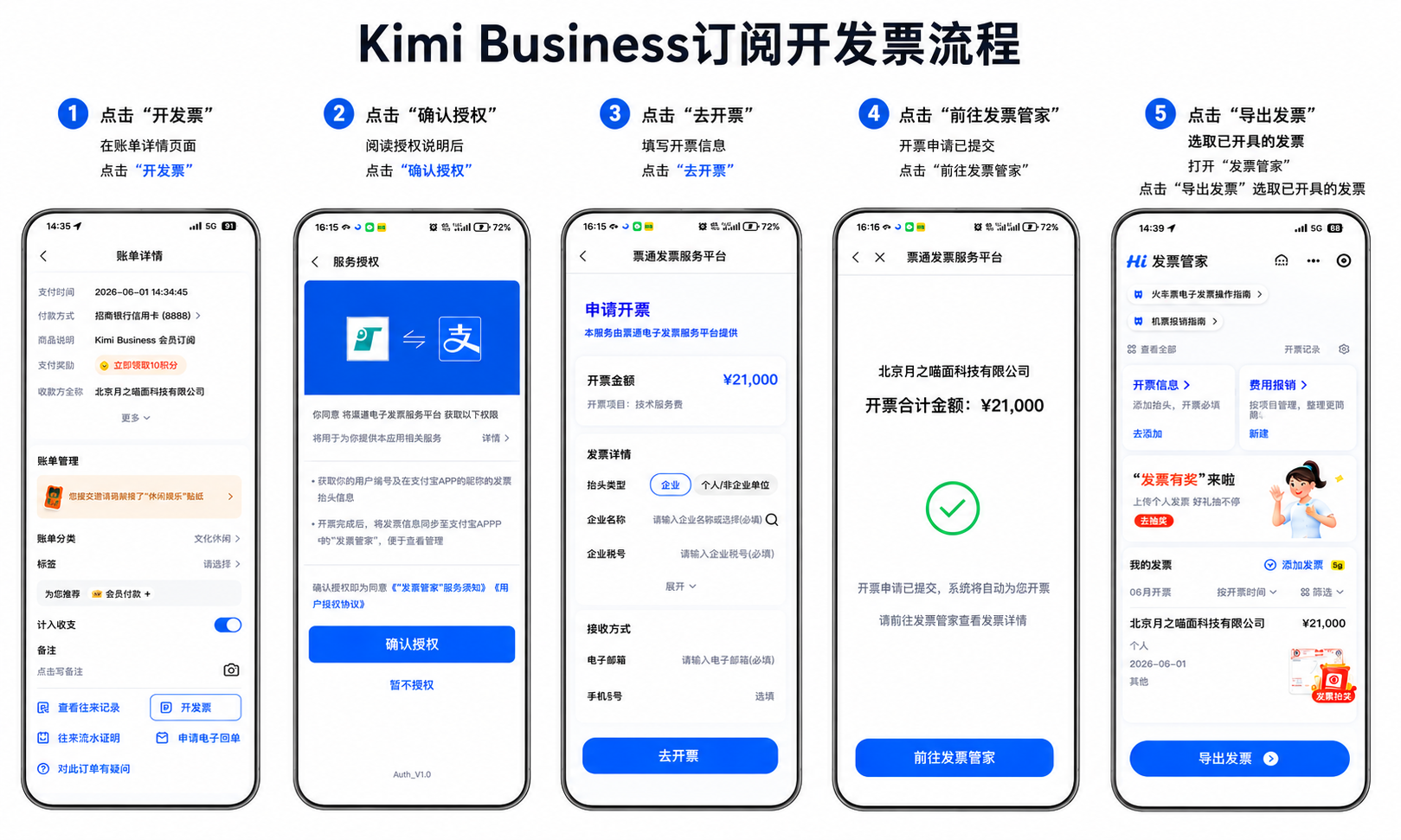
Kimi Business 订阅如何开发票?
国内订单支付完成后,请前往支付宝,在对应订单的账单详情页最下方找到「开发票」入口,并按支付宝页面提示填写发票信息、提交开票申请。开票完成后,可在支付宝「发票管家」中查看或导出电子发票。
Kimi Business 如何对公转账的方式支付?
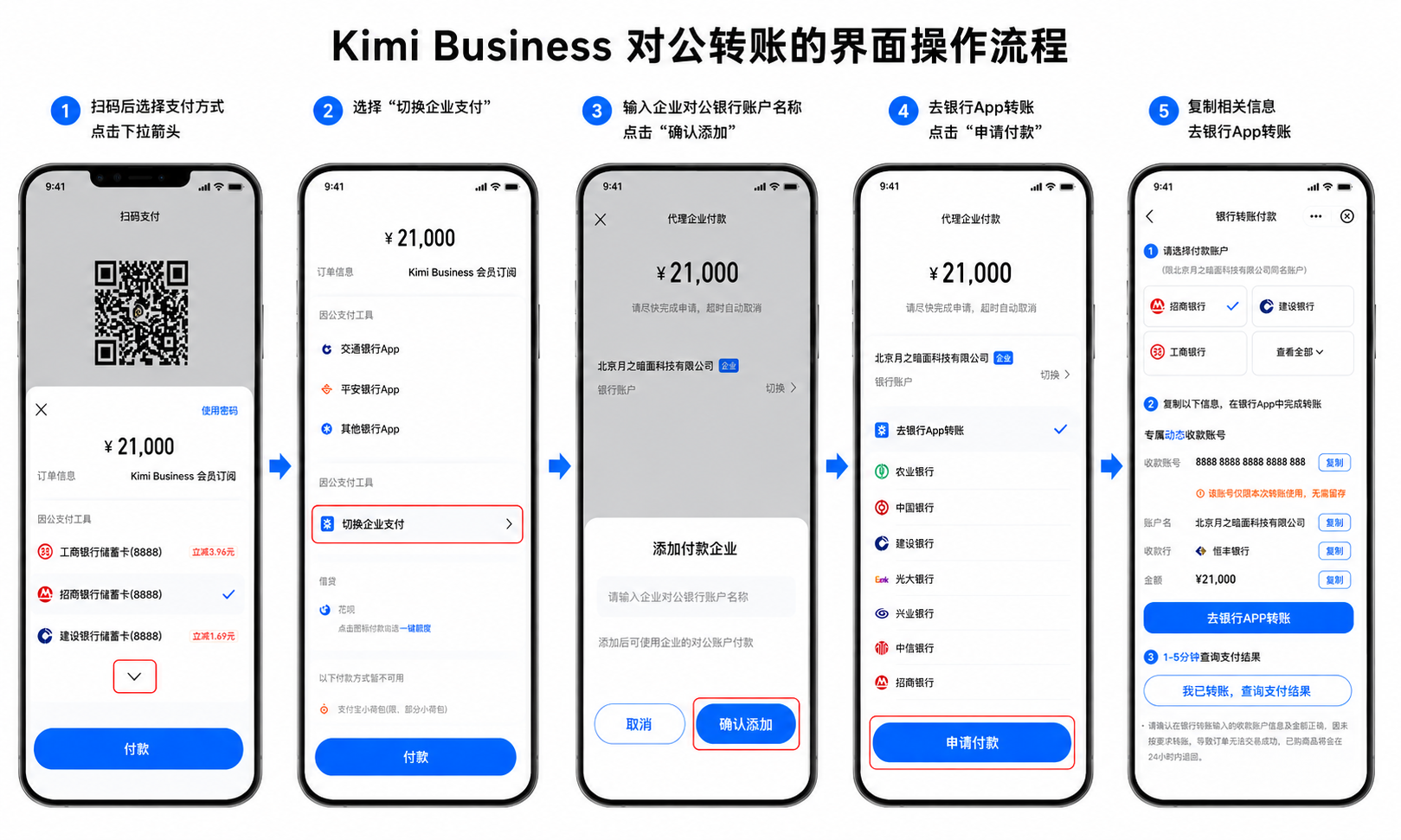
支持对公转账支付,操作流程如下:
-
选择支付方式
扫码后进入支付页面,点击下拉箭头展开支付方式列表。
-
切换企业支付
选择「切换企业支付」选项。
-
添加付款企业
输入企业对公银行账户名称,点击「确认添加」。
-
完成转账
复制收款账号、账户名、收款行及金额等信息,前往银行 App 完成转账,1-5 分钟后返回页面查询支付结果。
注意:收款账号仅限本次转账使用,无需留存;转账金额须与订单金额一致(示例:¥21,000);未按要求转账导致订单失败的,资金将在 24 小时内退回。如有疑问请联系客服邮箱 [email protected]。
为什么 Kimi Business 在 App 里显示不是会员?桌面端如何使用?
目前 Kimi App 暂不支持 Kimi Business 企业版功能,仅支持个人会员。桌面端已支持企业版,使用方式如下:
- 打开 Kimi 桌面客户端,登录已加入企业组织的账号。
- 在左上角切换到 Chat 模式。
- 点击头像 / 工作空间入口,切换到企业空间。
- 切换后即可在桌面端使用 Kimi Business 企业版权益。
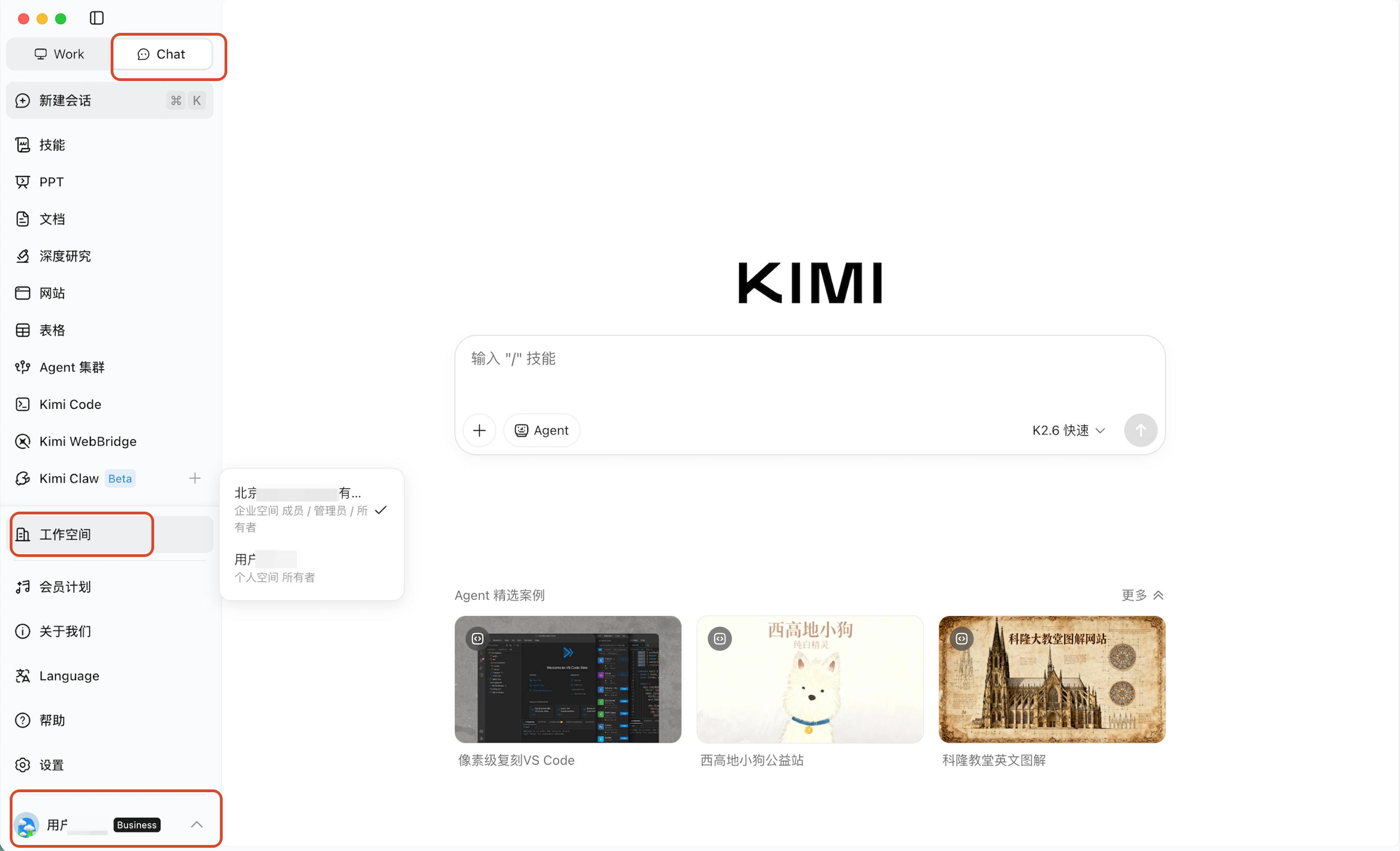
个人版和企业版相互独立,如果已开通个人会员,仍可在 App 正常使用个人会员权益;在桌面端可按当前工作空间使用个人或企业权益。
Kimi Business 授权、协议、合规、安全等问题在哪里查看?
Kimi Business 的授权、协议、合规、安全等问题,请以 Kimi 官方协议及页面公示为准。你可以先阅读 Kimi 用户服务协议 和 Kimi 付费服务协议,了解账号使用、付费服务、权益范围、风险提示和责任限制等说明。
如需企业合同、合规材料或安全相关资料,请联系销售或客服进一步确认。
本文是否对你有帮助