Kimi Docs & Kimi Sheets:办公能力升级
2026 年 1 月 27 日,Moonshot AI 正式发布了 Kimi K2.5,Kimi Agent 的办公能力迎来重要升级——开始“精通 Office”。
基准测评表明,Kimi K2.5 在办公场景下的实际输出质量和工具调用效率显著提升,特别是在结构化输出(如 Word 文档、Excel 表格、幻灯片设计)方面展现了端到端的处理能力。Kimi Agent 学会了使用 Office 软件的核心技能,并支持端到端输出文件:
- Word 智能排版与修改审阅
- PDF 视觉设计与图文混排
- Excel 数据分析与金融建模
- PPT 自动生成与视觉叙事
Kimi Docs 文档功能
Kimi 文档有较强的文本适应能力,能够系统理解 Office 的运作方式,包括表格里的单元格关系、Word 的标题层级、PDF 的排版逻辑。
Kimi 能像专业工作人员一样,直接输出可用的 Word 文档,并自动在 Word 中插入修订批注。具体能力包括:
- 从零生成长篇专业文档,包括白皮书、研究报告、合同、方案等格式
- 在原有 Word 文档里插入批注、修改意见,保留原格式
- 标题层级、正文间距、引用和列表格式处理干净
- 把 3 万字论文变成一份精准摘要文档,直接交付专业水平的办公文档
Kimi 可以像版面设计师一样,帮你策划视觉专题,自动编排图文,直接生成出版级 PDF 画册。具体能力包括:
- 生成图文并茂的专业报告型 PDF,含封面、目录、正文、图注
- 对现有 PDF 进行重新编辑排版,不需要专业排版软件
- 从百页 PDF 中精准提取指定信息(如销售线索、合同关键条款)
- 比较多个合同版本之间的细微差异,缩短商业决策迭代周期
使用 Kimi Docs 文档
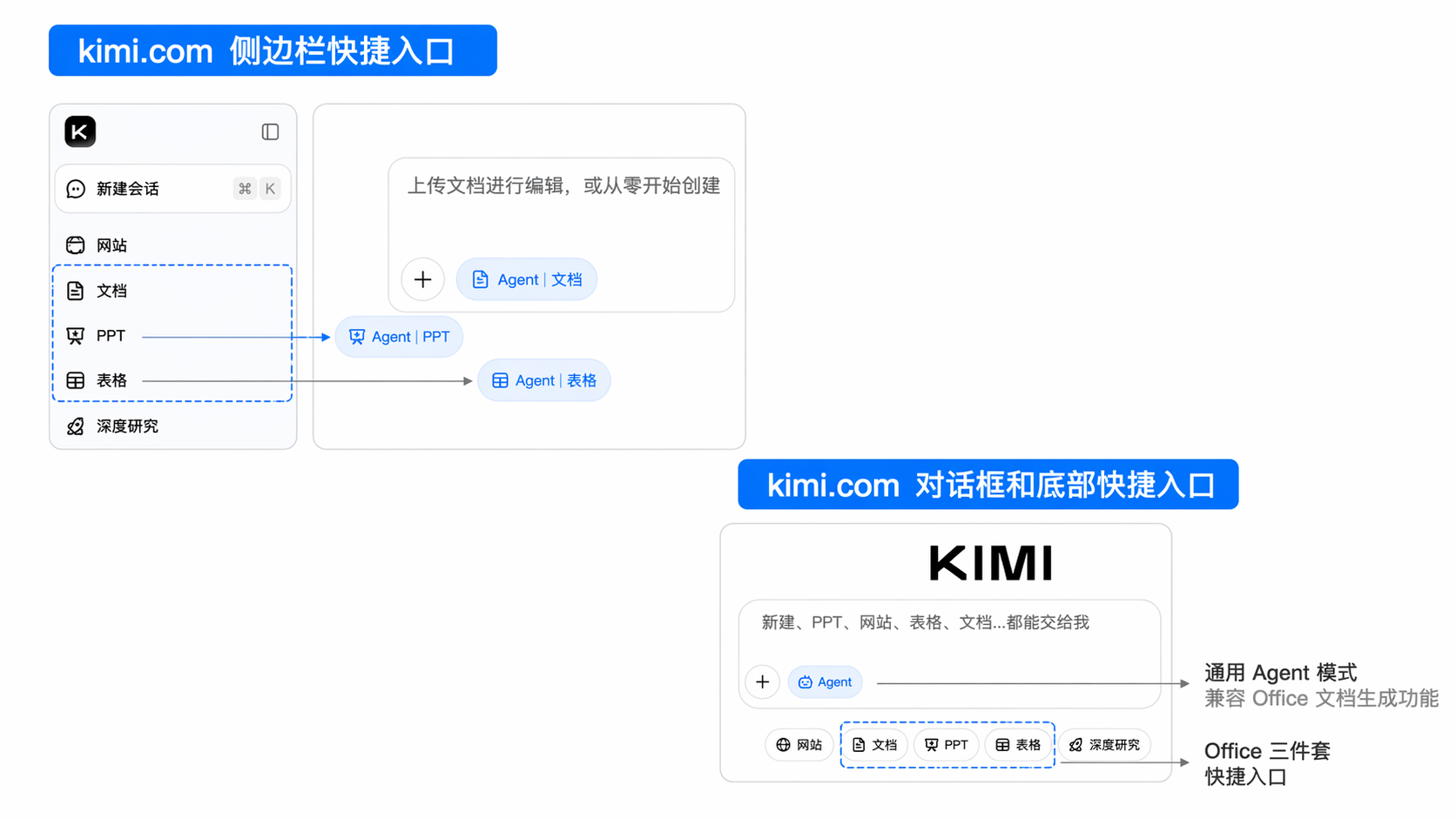
访问专属页面
专属入口:首先切换文档模式,点击对话框底部的“文档”按钮,调用文档生成能力。
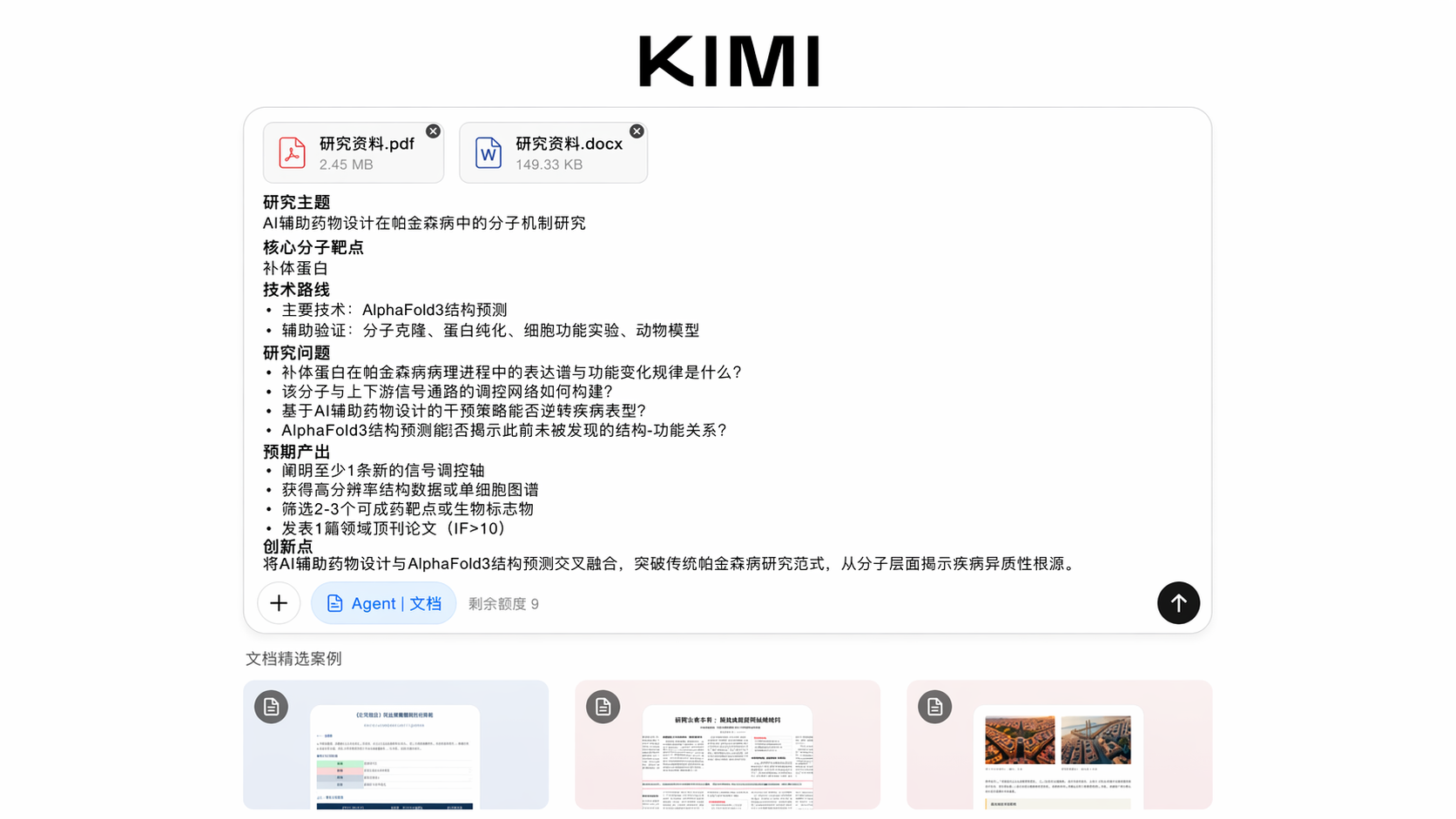
- 打开浏览器:使用 Chrome、Safari、Edge、Firefox 等主流浏览器
- 打开官方访问地址:Kimi Docs 专属页面:https://www.kimi.com/docs ,支持中文/英文两种界面
- 登录账号:使用 Kimi 账号登录(支持手机号、邮箱注册)
- 输入文档任务:Kimi Docs 提供三种主要生成方式:
- 文字输入:在对话框中输入任务,用自然语言描述想要创作的文档
- 上传文档进行编辑创作
- 点击文档精选案例,点击“做同款”,“修改提示词”,点击“发送”
- 开始创建文档:进入 Docs 文档功能界面,选择模板或直接对话创建
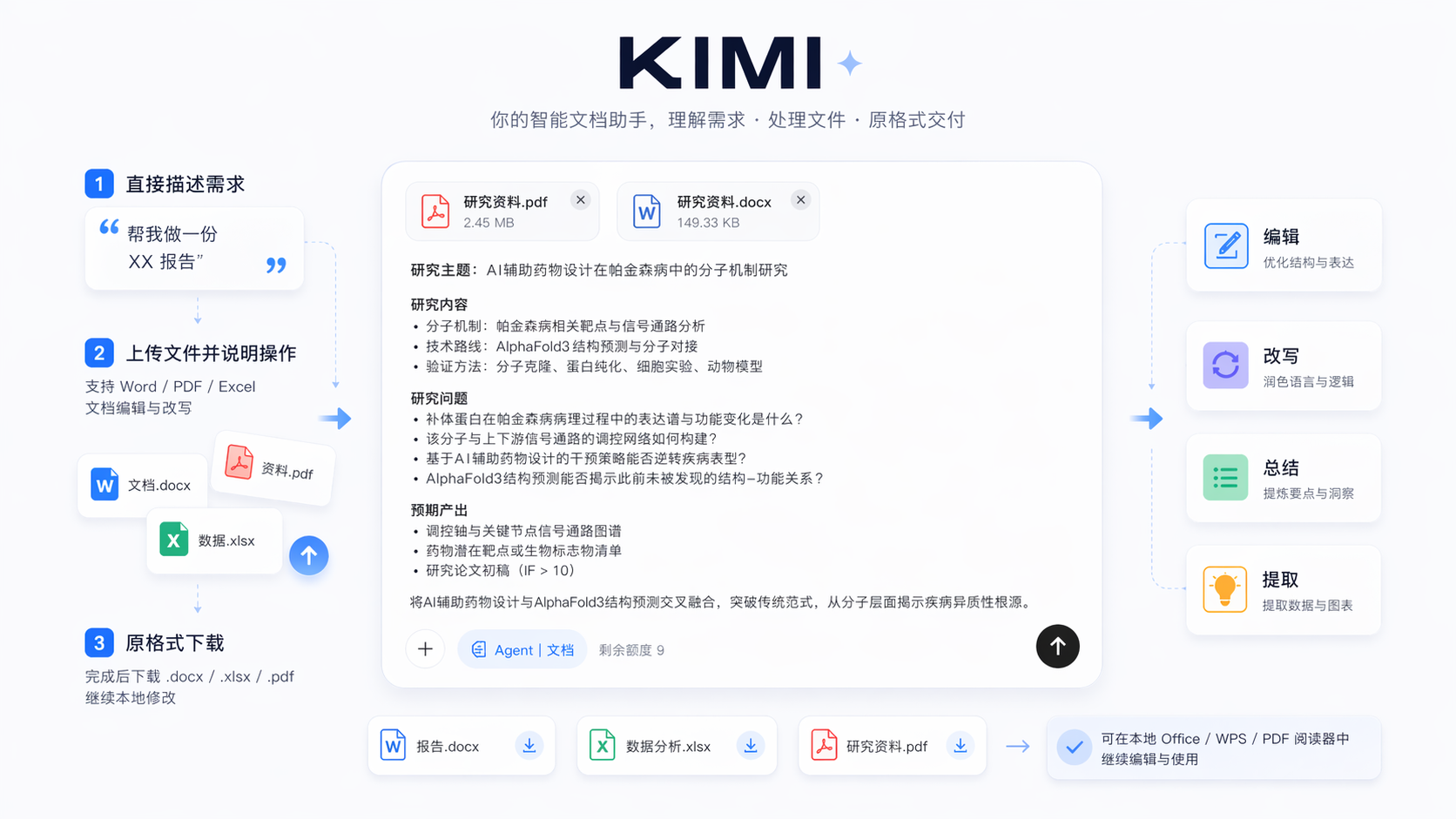
你可以直接描述需求,比如“帮我做一份 XX 报告”。 也可以上传已有 Word/PDF/Excel 文件,再说明要做什么操作,让 Kimi 帮你完成文档编辑与改写。 完成后直接下载 .docx / .xlsx / .pdf 原格式文件,在本地用对应文档处理软件继续进行修改。
移动 App
移动 App 选择专属文档工具
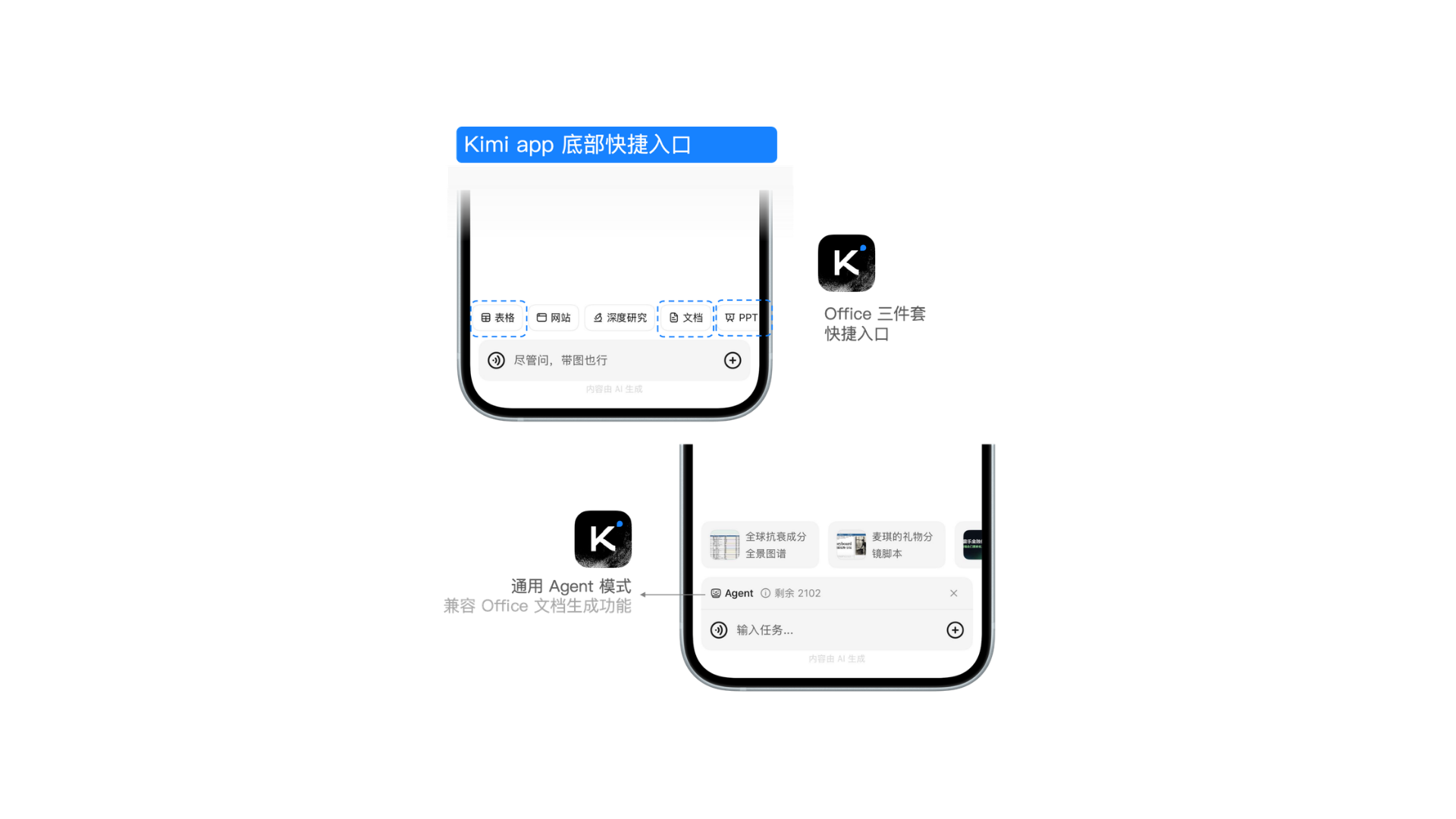
iOS/Android/鸿蒙均有官方 App(应用名“Kimi”),在输入框上方,点击工具栏(Taskbar)→ 切换至文档(Docs)模式,内含多模态生成工具与 Agent 功能,可进行文档生成需求。
通用 Agent 模式
在通用 Agent 模式下,输入文档任务需求
在官网或移动设备,选择 K3 模型,并输入生成文档相关的任务指令,Kimi 会调用阅读、撰写执行工具。
Kimi Sheets 表格功能
Kimi Sheets(Kimi 表格)能够系统理解 Office 的运作方式,包括表格里的单元格关系、多 Sheet 之间的联动逻辑,最终在网页版直接产出 xlsx 文件。Kimi 在做复杂表格时,能主动用函数把同一个文件里的多张表连起来用。Kimi Sheets 功能支持:
- 大量数据录入:从文档中提取数据,例如,从行业展会 PDF 中提取参展商信息,整理成 1000 行销售线索 Excel
- 多源报表汇总:多源报表汇总合并,可以支持 50 个不同部门 Excel 报表,一键生成公司月度总表
- 纯自然语言输入:自主搜索,支持生成智能表格
使用 Kimi Sheets 表格
首先点击对话框底部的“Agent”按钮,或在侧边栏选择“表格”快捷入口。
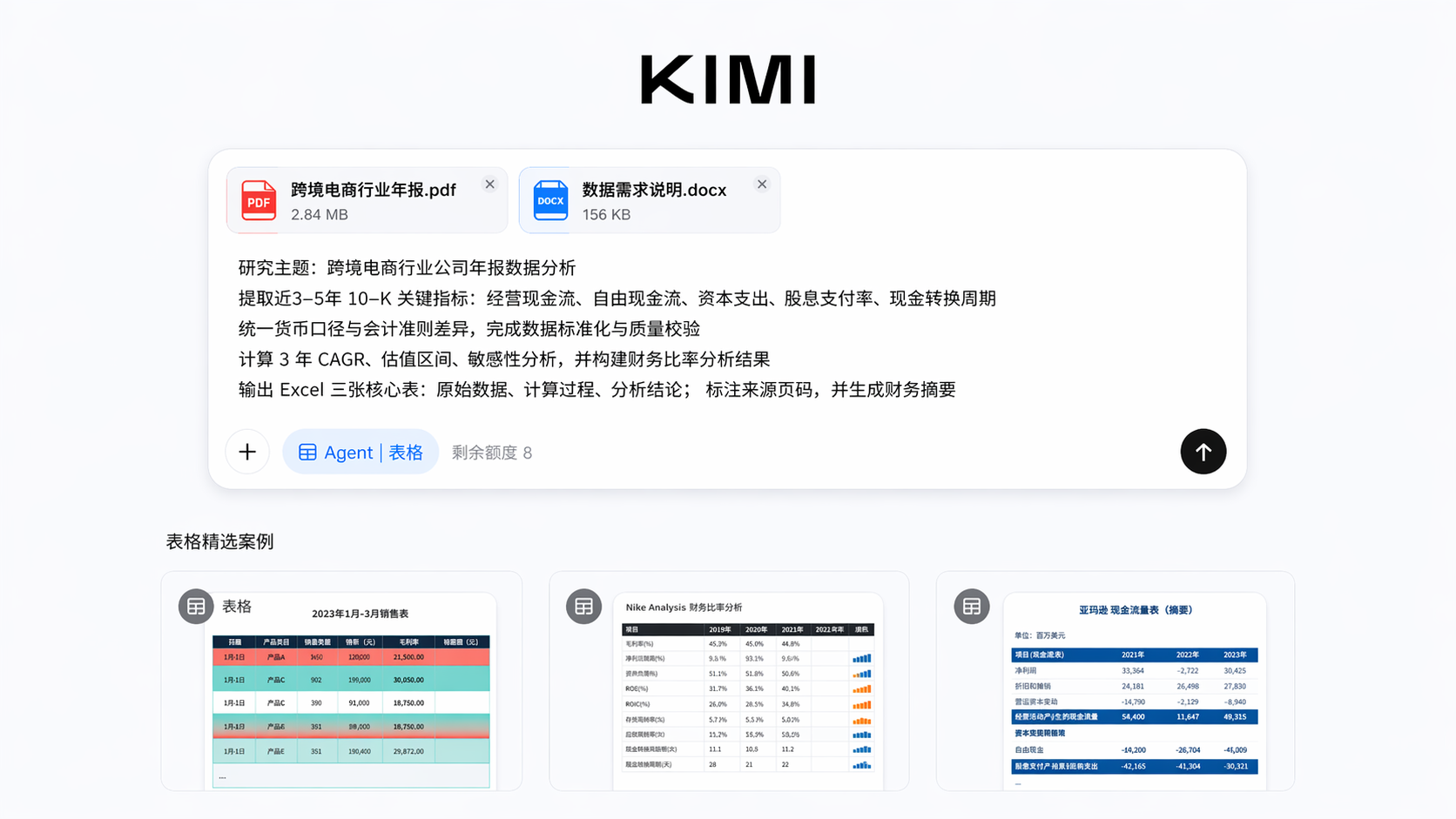
你可以直接说“检索网络内容,帮我选择关于 XX 领域的最新文献,输出 Excel 文档”,也可以上传已有 Excel/CSV 格式文档,说明要做什么操作。在线预览表格结构,确认无误后下载 .xlsx 文件,在本地 Excel/WPS 中继续精修。
适用人群
| 人群 | 应用场景 |
|---|---|
| 职场白领 | 快速生成工作方案、汇报材料、会议纪要,把从写文档中解放出来的时间投入到决策本身 |
| 研究人员 | 把大量调研素材、访谈记录、行业报告一键整合成结构清晰的白皮书或研究报告,摆脱“素材有了但整理耗时”的瓶颈 |
| 学术工作者 | 将论文、综述快速转化为摘要、汇报文档,把实验数据快速计算、输出成表格 |
| 法律从业者 | Kimi 文档功能有强大的审查和批注功能,可以用于法律文件修订 |
| 创业者 | 快速产出商业计划书、合作方案、投资人材料,节省与外部撰稿或设计师的沟通成本 |
| 投资分析师 | 直接用自然语言驱动 DCF 建模、财务预测、估值分析,把过去两天的建模工作压缩到十几分钟 |
| 市场运营 | 快速完成多渠道数据汇总、竞品对比表、活动效果分析,不再依赖数据团队排期 |
本文是否对你有帮助