Kimi Moon Companion Plan User Guide

The Kimi Moon Companion Plan is a friend-invitation campaign for Kimi users. Invite a friend to complete specified tasks, and both the inviter and the friend can earn lucky draw chances to win Kimi membership-equivalent credits.

The “Invite friends to subscribe to Kimi membership” task is currently paused. The “Invite friends to register for Kimi” task remains available. Please refer to the campaign page for when subscription invitations resume.

1. How to access the campaign page

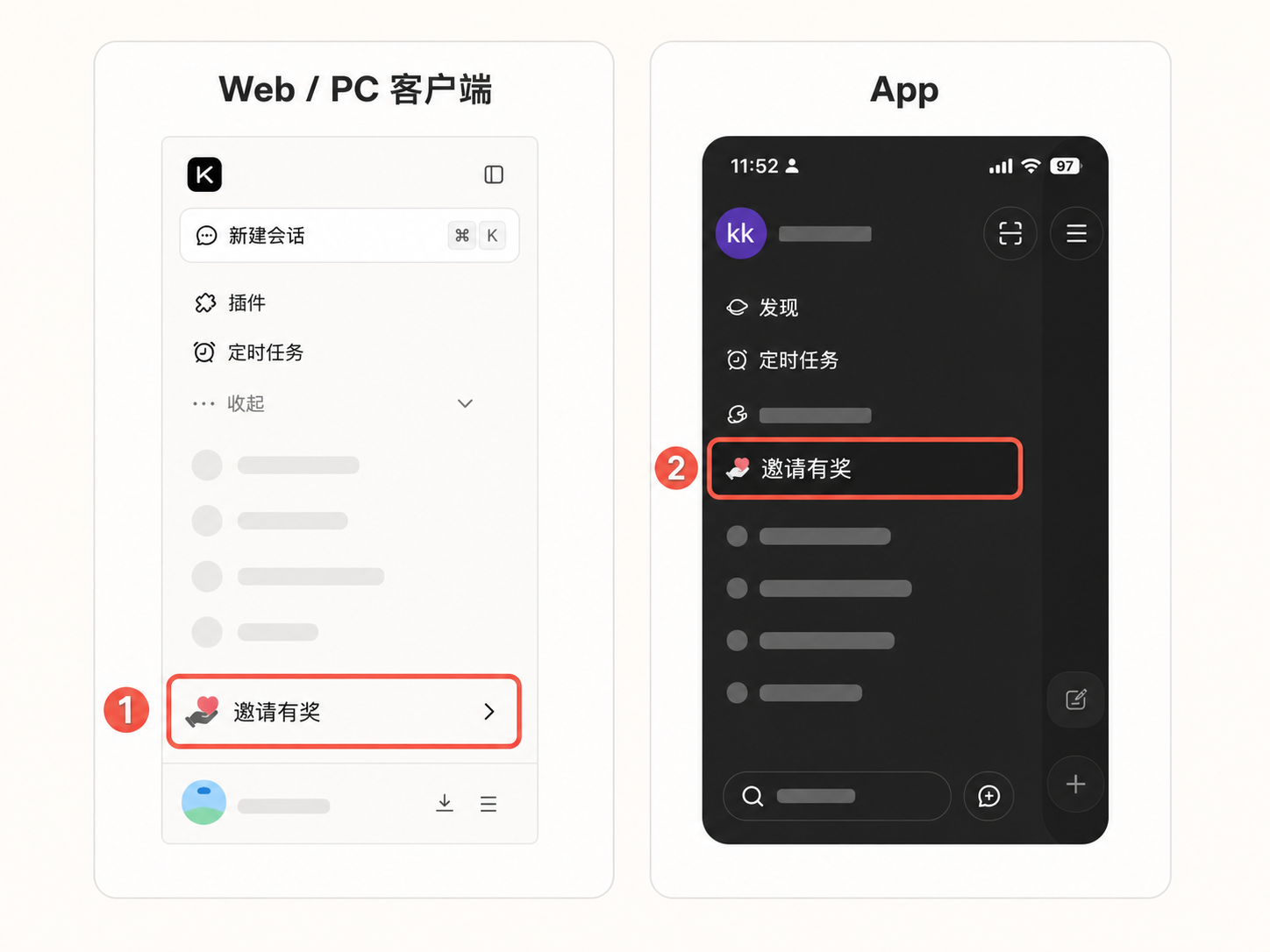
  • Web or PC client: open the left sidebar and click “Invite & Earn Rewards” at the bottom.
  • Kimi App: open the sidebar and click “Invite & Earn Rewards” in the “My” section.

You can also join directly from the “Invite & Earn Rewards” campaign page.

Campaign rules are available in the upper-right corner of the campaign page. The latest tasks, prizes, and campaign period shown on the campaign page shall prevail.

2. How to invite friends

  1. Go to the “Invite & Earn Rewards” campaign page.
  2. Find the “Invite friends to register for Kimi” task.
  3. Click “Invite now” and share the invitation link or the campaign poster QR code with your friend.
  4. Your friend enters the campaign page through your link or QR code, then completes registration, binding, and client login.
  5. After the task is completed, each of you will receive one lucky draw chance.

3. What counts as a successful invitation

Your friend must complete the full invitation process. Simply clicking the link does not mean the task is complete.

To complete the registration invitation task, all of the following conditions must be met:

  • Your friend has never registered for Kimi before. Re-registering after account cancellation does not count as a first registration.
  • Your friend enters the campaign page through your invitation link or poster QR code.
  • Your friend completes first-time registration directly on that page and establishes the invitation relationship.
  • Within 3 hours after registration and binding, your friend downloads and logs in to the Kimi App or PC client.
  • The account used to log in to the client is the same account used for registration.

No lucky draw chance will be granted in any of the following cases:

  • Your friend registers on their own first, then opens the invitation link afterward.
  • Your friend opens the link but exits midway without completing registration or binding.
  • Your friend registers only on the web and does not log in to the App or PC client.
  • Your friend logs in to the client more than 3 hours later.
  • Your friend has registered for Kimi before, including re-registration after account cancellation.
  • The invited user uses an Enterprise account.

The same friend can successfully help with the same type of task only once. After the friend completes the task for the first time, only the first inviter successfully bound to that friend can receive a lucky draw chance. Opening another person’s invitation link afterward will not trigger an additional reward.

4. Why friend invitations for membership subscription are unavailable

Kimi has currently paused new membership subscriptions for individual users, so the “Invite friends to subscribe to Kimi membership” task is also temporarily closed.

We are working to expand computing capacity. As subscription slots are gradually restored, this invitation task will resume accordingly. Please follow the campaign page for the exact timing.

After the task resumes, your friend must complete the membership subscription and make a successful payment within 24 hours after binding the invitation relationship for the subscription task to be considered complete.

If your friend later receives a full refund, cancels the subscription, or the order is deemed invalid:

  • The corresponding invitation task will be treated as incomplete;
  • Any unused lucky draw chances for both parties will be withdrawn;
  • Lucky draw chances that have already been used and prizes already won will not be recovered.

5. How to use lucky draw chances

After you receive a lucky draw chance, go to the campaign page and click “Draw now”.

Each draw consumes one chance. Once used, a lucky draw chance cannot be cancelled or returned. Please confirm before proceeding.

6. What prizes are available

Campaign prizes are Kimi Andante membership-equivalent credits, including:

  • 3-day membership-equivalent credits
  • 7-day membership-equivalent credits
  • 15-day membership-equivalent credits
  • 1-month membership-equivalent credits
  • 1-year membership-equivalent credits

These tiers represent the corresponding amount of usable credits. They do not mean you can use the service for the stated number of days on a fixed basis. For example, “1-year membership-equivalent credits” does not mean the credits are valid for one year, nor does it guarantee one year of continuous use. The actual usable duration depends on task consumption, and use stops once the credits are exhausted.

Credits from this campaign are valid until December 31, 2026. The final validity period is subject to what is actually shown in “My Prizes” or on the credits page.

Campaign prizes are for the winning account holder’s own use only and cannot be transferred, gifted, sold, withdrawn as cash, converted to cash, or traded in any other form.

7. Where to check prizes and remaining credits

  • Prize records: go to the campaign page and click “My Prizes”.
  • Credit usage: go to “My Subscription” and check the credit progress bar for this campaign.
  • Distinguishing credits from different campaigns: use the expiry date shown on the credits page. Credits expiring on December 31, 2026 are credits granted under this Moon Companion Plan.

After a draw, credits are usually issued automatically to the current Kimi account. Due to network or system processing, there may be a short delay before they arrive. If you do not see the credits yet, refresh the campaign page first, or check “My Prizes” and the credits page again later.

8. What to do if you did not receive a lucky draw chance

We recommend checking the following in order:

  1. Whether your friend entered the campaign page through your invitation link or QR code.
  2. Whether your friend completed first-time registration and invitation binding directly on the campaign page.
  3. Whether your friend had previously registered for Kimi.
  4. Whether your friend logged in to the Kimi App or PC client within 3 hours.
  5. Whether your friend used the same account for client login as the one used during registration.
  6. Whether your friend has already completed the same type of task for another inviter.
  7. Whether the invited user is using an Enterprise account.

If all of the above conditions have been met but neither party has received a lucky draw chance, please contact customer support and provide:

  • The inviter’s Kimi account information, such as the registered mobile number or email address;
  • The invited user’s Kimi account information;
  • Screenshots of the current campaign page and lucky draw page;
  • A screenshot showing that the invited user has downloaded and logged in to the client;
  • The approximate time when your friend completed registration and client login.

We will verify the details after receiving the above information.