Deep Research FAQ

Deep Research is stuck or not returning results?

Deep Research performs extensive web searches, source verification, and reasoning. A page that hasn't visually updated does not mean the task has been interrupted.

What you can do:

  1. Refresh the browser page
  2. Temporarily leave the current conversation (this does not affect task execution)
  3. Check back later — the task continues running in the background

If no results appear after refreshing, verify that your network connection is stable and wait a few more minutes.

Execution time: Deep Research typically takes 10–25 minutes. You can leave the page during execution — the task runs asynchronously and you'll be notified upon completion. If the page appears unresponsive, refresh — do not click "Stop output."

Search or reasoning direction went wrong?

If Deep Research's search direction or reasoning has significantly deviated from expectations, click the "👎" button at the bottom of the page and briefly describe the issue — e.g., "search drifted off-topic" or "conclusions contradict known facts." Our team will review within 1–3 business days. If confirmed, credits for that task will be automatically refunded.

How to reduce direction drift — when submitting your question:

TipDescription
Focus the scopeDefine time range, geographic scope, and source types to avoid overly broad questions
Leverage clarificationUse the clarification prompt to state directions you don't want covered and add focus dimensions
Keep input conciseOverly long or unclear input during clarification may cause drift

What is Deep Research's context length?

Deep Research uses a context length of 128K tokens (approximately 200,000 words).

This means Kimi-Researcher can process and reference a substantial volume of text in a single research task — more than enough to support complex, in-depth report generation.

Tip: If your research question is too broad, consider breaking it into multiple sub-questions and researching them separately. This improves the depth and accuracy of each individual task.

Credits were deducted before the task finished?

Deep Research distinguishes between "standard conversations" and "task execution." Once you select a Deep Research task, billing is applied based on the task type.

  • Billing method: Credits are deducted from the shared pool (other membership features). Kimi Code uses a separate credit pool.
  • Refund on failure: If a task fails (no valid results returned), click the "👎" feedback button. Our team will verify the issue and refund the corresponding credits.

To check remaining credits, hover over the Deep Research mode button to view your current free and paid remaining credits.

For further assistance, use the in-product "👎" feedback button to contact our team, or email [email protected].

I stopped the task myself — why were credits still deducted?

Once Deep Research begins, the system immediately allocates compute resources for retrieval, verification, and reasoning. Since resources are already reserved, manually clicking "Stop" or closing the page is treated as consumed credits.

If the page hasn't updated for an extended period, try refreshing the browser or checking back later — avoid terminating the task based on a false assumption that it's stuck. Deep Research typically takes 10–25 minutes; you can leave the page during execution — the task runs asynchronously in the background and you'll be notified upon completion.

Can't download or save a Deep Research report?

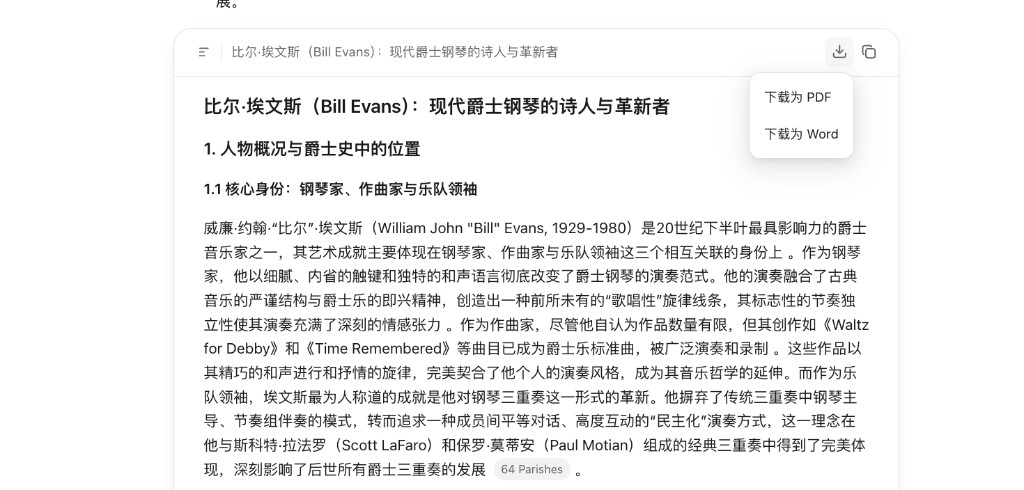
Deep Research produces two types of reports, both of which can be saved.

Text research report

Click the "Download" or "Copy" button in the upper-right corner. The report can be saved locally or pasted for use. Export formats: PDF and Word.

Visual report

Click "Preview" → "Share" → "Copy link" → open in a browser → right-click "Save as" to save as HTML, PDF, or other formats.

Visual report features:

  • Preview: Click "Preview" to switch between desktop and mobile views
  • HTML source code: Click Preview → switch to "Code mode" to copy the source code
  • Public sharing: Click Share to generate a public sharing link