Kimi Code benefits

Kimi Code is a service included in the Kimi membership plan, providing coding-related support and features to help members complete programming tasks more efficiently in their personal development workflow.

Please note that this benefit is intended for personal development use only, not for enterprise development scenarios. For enterprise needs, please visit the Kimi Open Platform.

Billing

  • Kimi Code usage is included in your subscription fee — no additional charges apply.
  • Kimi Code shares the same credits as your Kimi membership plan — requests from the CLI, VS Code, and third-party tools all count toward them; different plans include different credit amounts.
  • The system prioritizes bonus credits before consuming plan credits.

A new membership system is coming soon. Kimi membership benefits and Kimi Code benefits will be split so you can purchase each separately, as needed — more flexible. Current subscribers are unaffected. If you'd like to keep using the merged benefits, purchase your current plan before the new system launches.

Credit refresh

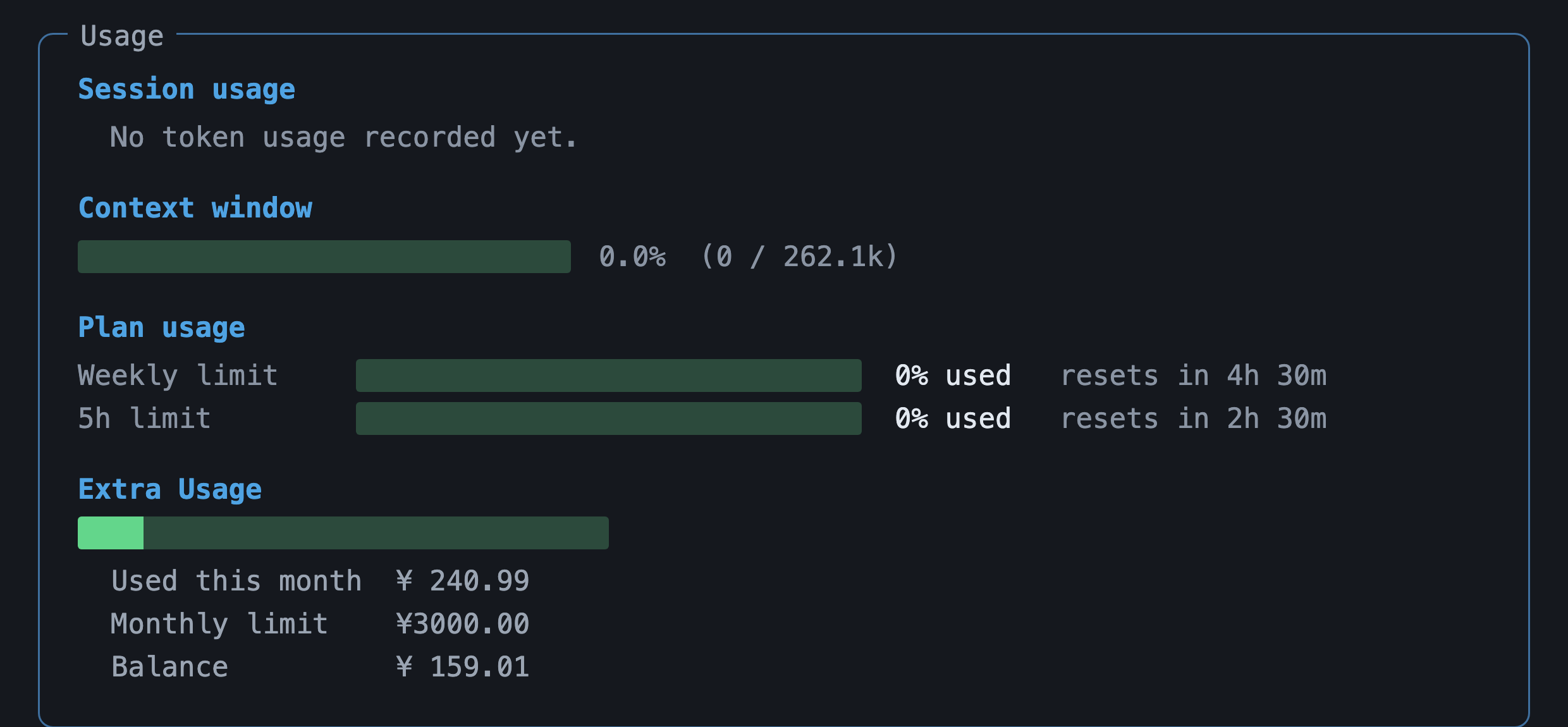
Credits refresh on a 7-day cycle:

  • Starting from your subscription date (D1), credits refresh every 7 days.
  • Refresh periods: D1–D7, D8–D14, D15–D21, D22–D28.
  • Unused credits do not carry over to the next cycle.

Plan your weekly usage to make the most of your credits.

Supported tools

Kimi Code benefits are available with the following tools:

ToolDescription
Kimi Code CLIKimi's official command-line AI agent
Claude CodeAnthropic's command-line coding assistant
Roo CodeAI coding extension for VS Code

Using your Kimi Code API Key with platforms or tools not listed above may be considered misuse and could result in restricted access. Please use the supported tools listed above for the best experience and coverage.

Extra Usage

When your subscription credits run out, you can keep making requests using your Extra Usage balance without waiting for a refresh. Only subscribed members can enable it, and Kimi on the web and Kimi Code share the same Extra Usage balance (top up once, use it in both). See the full terms in the Extra Usage Agreement.

Top-up entry points

  • From the main site: go to the Kimi Subscription page, scroll to the "Extra Usage" module at the bottom, choose an amount, and complete payment.
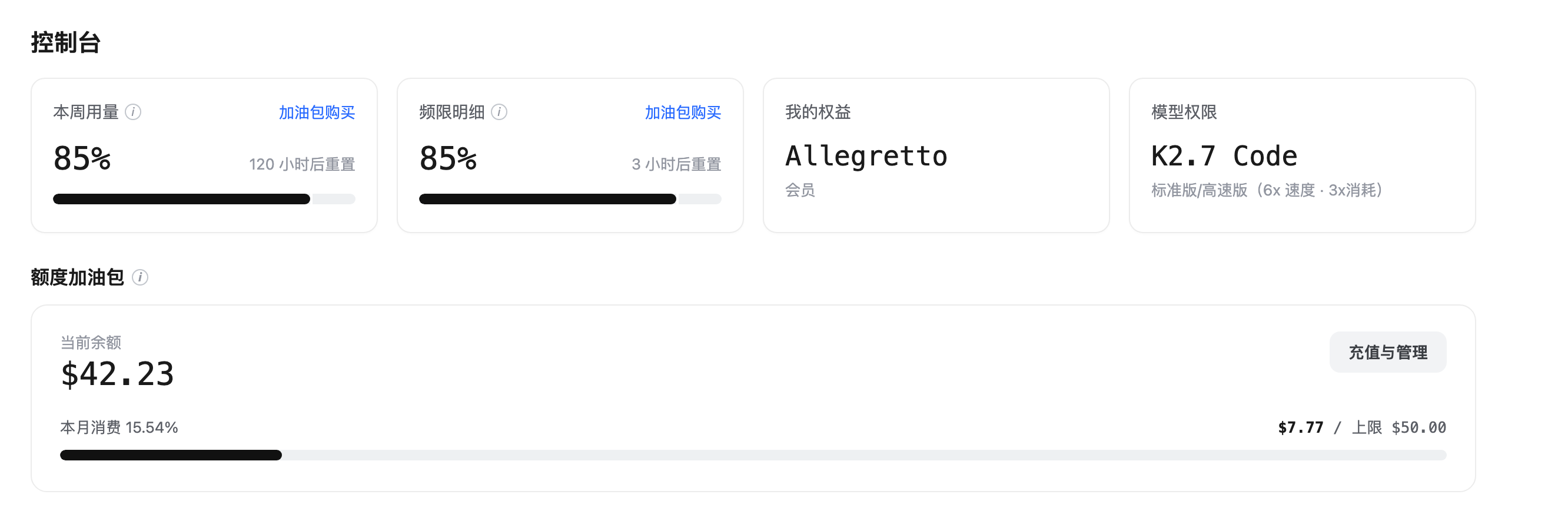
  • From the Kimi Code Console: once your weekly or 5-hour usage exceeds 80%, the progress card shows a Buy Extra Usage button that takes you to the subscription page to purchase.

Enabling and managing

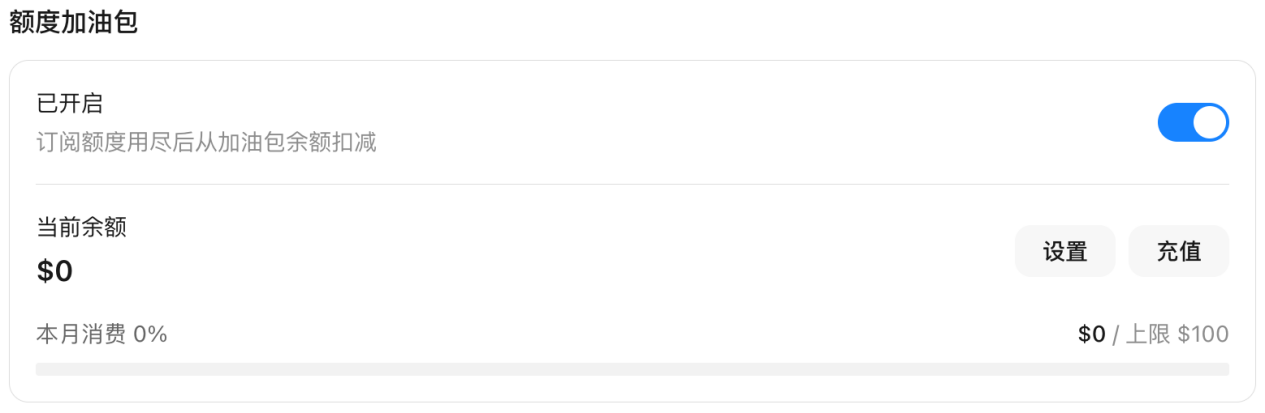
Turn on the "Extra Usage" toggle, and when your subscription credits run out, the system automatically deducts from your Extra Usage balance. Click Settings in the module to enable a monthly spending cap and set the maximum you can spend this month; the progress bar shows this month's Extra Usage consumption in real time.

Billing and rules

  • Billing: charged by actual usage — the more content read and generated, and the more complex the task, the higher the cost. The balance is shown in RMB, with rates as displayed on the platform. Extra Usage pricing is close to the official API pricing of the Kimi Open Platform; for heavy usage, upgrading your subscription is usually more cost-effective.
  • Deduction priority: time-limited credits such as your subscription are deducted first; Extra Usage is deducted last as a fallback. Once enabled, even if your subscription credits are maxed out, Extra Usage is consumed seamlessly and tasks don't stop or error out.
  • Spending cap: enable a "monthly spending cap" in settings to limit how much Extra Usage can be spent this month; without it, there is no cap.
  • Validity and stacking: the balance does not expire and stacks across top-ups; it remains usable after your subscription lapses, but you can't top up during the lapse — re-subscribe first to top up again.
  • Refunds: generally non-refundable, non-transferable, and non-redeemable.

Billing example (for a rough sense of scale; actual rates per the platform): a simple request (e.g. "recommend a rock song") costs about ¥0.03; a complex multi-step task (e.g. "plan a week-long road trip from Chengdu to western Sichuan") costs about ¥1.6. Top-up limits: minimum ¥25 per top-up, up to 10 times and ¥3,000 per day, with a balance cap of ¥10,000.

Checking your usage

  • Kimi web / app: Settings → Subscription & Invoices → My Quota.
  • Kimi Code Console: once Extra Usage is enabled, log in to the Console to view your balance and usage.
  • Kimi Code CLI: type /usage on the command line to check directly.

Extra Usage FAQ

  • Do Kimi on the web and Kimi Code use the same Extra Usage wallet? Yes — the balance is shared between both; top up once and use it in either.
  • Which is deducted first, Extra Usage or subscription credits? Time-limited credits such as your subscription are deducted first; Extra Usage is only used as a fallback once all time-limited credits are exhausted.
  • When I hit a limit or get rate-limited, can I keep going? Yes. Once Extra Usage is enabled you're not affected by subscription limits — it seamlessly switches to the Extra Usage balance, so tasks don't stop, and only Extra Usage is deducted without affecting your membership credit refresh.
  • Can unused balance roll over and stack? Yes — it doesn't expire and stacks; it stays usable after the subscription lapses, but you can't top up during the lapse.
  • Is Extra Usage available for Enterprise? Not yet supported.
  • After I close my account, is the balance refunded? Please email [email protected] to request a refund.