Claude Code
Claude Code is a programming agent product from Anthropic. Its interface, configuration options, and supported capabilities may change across versions. This guide describes a general integration approach: forwarding Claude Code model requests to the Kimi Code API through environment variables.
Before You Start
- Make sure you have subscribed to Kimi membership and activated Kimi Code benefits.
- Obtain an API Key:
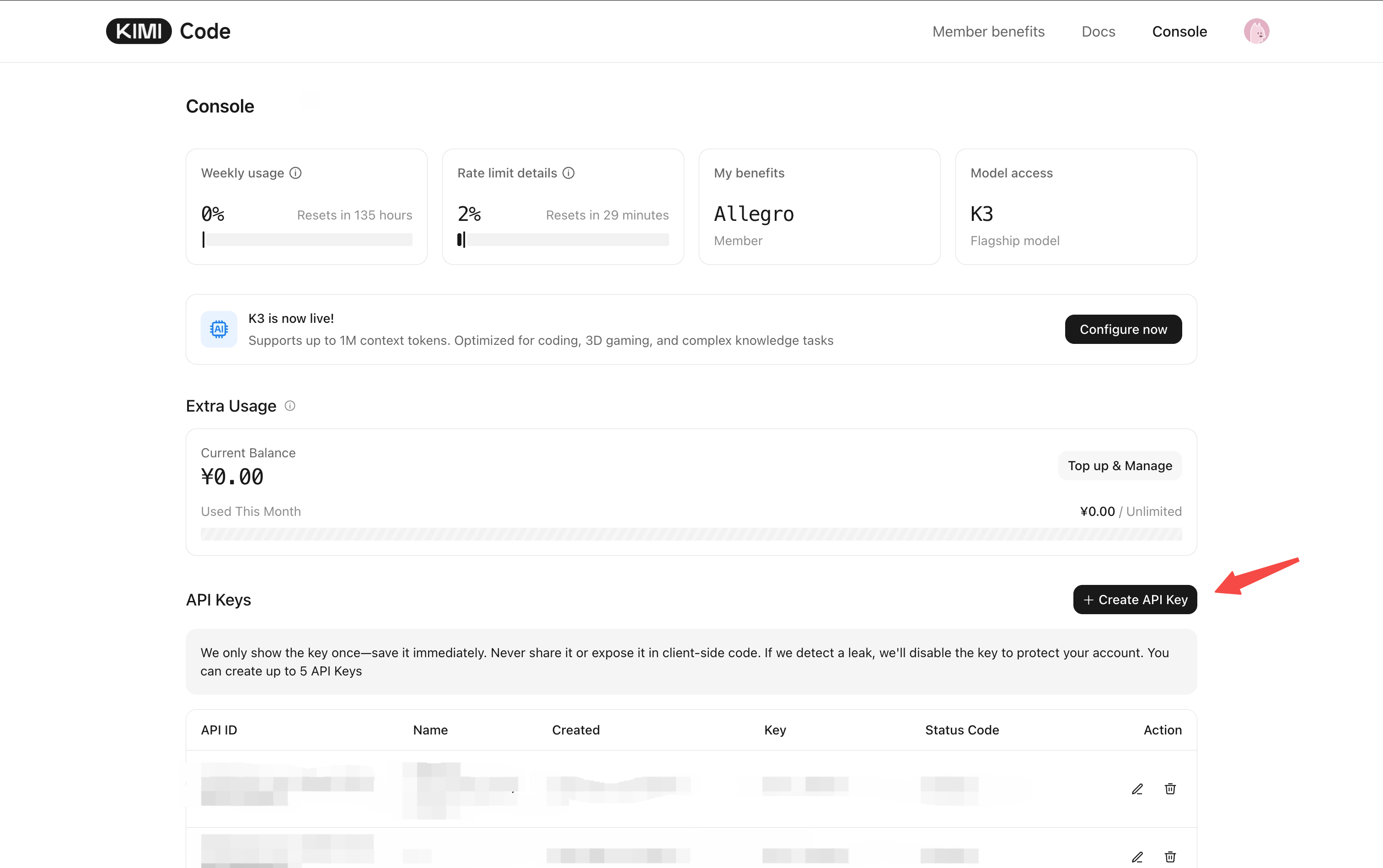
- Go to the Kimi Code Console;
- Click "Create API Key", enter a name and confirm;
- Copy the generated key and keep it safe (the full key cannot be viewed again after closing the dialog).
Configuration
Claude Code is a command-line programming assistant launched by Anthropic. By configuring environment variables to connect it to Kimi's API endpoint, you can directly call Kimi Code's AI capabilities within Claude Code and enjoy the Kimi Code programming experience in a familiar terminal interface.
① Install Claude Code
For installation instructions, please refer to the Claude Code official documentation.
│
② Run Script to Skip Login
After installation, do not start Claude directly. Execute the following script in the terminal first to skip Anthropic's default login flow and clean up historical configuration:
node --eval "
// enable third party model support and fast mode
const claudeJsonFilePath = path.join(os.homedir(), '.claude.json');
if (fs.existsSync(claudeJsonFilePath)) {
    const content = JSON.parse(fs.readFileSync(claudeJsonFilePath, 'utf-8'));
    fs.writeFileSync(claudeJsonFilePath, JSON.stringify({ ...content, penguinModeOrgEnabled: true, hasCompletedOnboarding: true }, null, 2), 'utf-8');
} else {
    fs.writeFileSync(claudeJsonFilePath, JSON.stringify({ penguinModeOrgEnabled: true, hasCompletedOnboarding: true }), 'utf-8');
}

// delete old endpoint, credential and model id
const claudeSettingsJsonFilePath = path.join(os.homedir(), '.claude', 'settings.json');
if (fs.existsSync(claudeSettingsJsonFilePath)) {
    const content = JSON.parse(fs.readFileSync(claudeSettingsJsonFilePath, 'utf-8'));
    if (typeof content === 'object' && typeof content.env === 'object') {
        for (const element of [
            'ANTHROPIC_BASE_URL',
            'ANTHROPIC_API_KEY',
            'ANTHROPIC_AUTH_TOKEN',
            'ANTHROPIC_MODEL',
            'ANTHROPIC_SMALL_FAST_MODEL',
            'CLAUDE_CODE_SUBAGENT_MODEL',
            'ANTHROPIC_DEFAULT_FABLE_MODEL',
            'ANTHROPIC_DEFAULT_FABLE_MODEL_NAME',
            'ANTHROPIC_DEFAULT_OPUS_MODEL',
            'ANTHROPIC_DEFAULT_OPUS_MODEL_NAME',
            'ANTHROPIC_DEFAULT_SONNET_MODEL',
            'ANTHROPIC_DEFAULT_SONNET_MODEL_NAME',
            'ANTHROPIC_DEFAULT_HAIKU_MODEL',
            'ANTHROPIC_DEFAULT_HAIKU_MODEL_NAME',
            'ENABLE_TOOL_SEARCH',
            'CLAUDE_CODE_AUTO_COMPACT_WINDOW',
            'CLAUDE_CODE_EFFORT_LEVEL',
        ]) {
            delete content.env[element];
        }
        fs.writeFileSync(claudeSettingsJsonFilePath, JSON.stringify(content, null, 2), 'utf-8');
    }
}
"
The settings.json cleanup part only removes endpoint, credential, and model-related entries under env (leftovers there override environment variables exported in the terminal) — other settings are untouched. Also check ~/.zshrc, ~/.bashrc, and other shell config files for leftover ANTHROPIC_* exports (Windows users should check user environment variables) and remove them as well.
│
③ Configure API Access
Recommended model launch
K2.8 Preview is now fully rolled out in Kimi Code — kimi-for-coding is upgraded in place with no configuration changes: performance close to K3, with low / high / max thinking effort levels and up to 1M context. See What's New.
First check your membership tier to confirm which models and context windows you can use (see Membership Benefits for a comparison of the legacy and new plans):
| Plan | Available Models | Available Context Limit |
|---|---|---|
| Go (new plans) | No coding quota | — |
| Andante (legacy plans) | kimi-for-coding | 1048576 |
| Plus / Moderato | k3k3-256kkimi-for-coding | k3: 262144k3-256k: 262144kimi-for-coding: 1048576 |
| Pro and above / Allegretto and above | k3k3-256kkimi-for-codingkimi-for-coding-highspeed | k3: 1048576k3-256k: 262144kimi-for-coding: 1048576kimi-for-coding-highspeed: 262144 |
Two configuration methods are available — pick one, do not mix them: Method 1 writes to the settings.json config file and takes effect permanently regardless of how Claude Code is launched; Method 2 exports variables in the current terminal only, effective for that session.
Method 1: Write to settings.json (recommended, persistent)
The path of settings.json:
~/.claude/settings.jsonC:\Users\<username>\.claude\settings.jsonWrite the following into the env field of that file (create the file if it does not exist):
{
  "env": {
    "ANTHROPIC_BASE_URL": "https://api.kimi.ai/coding/",
    "ANTHROPIC_API_KEY": "Your API Key",
    "ANTHROPIC_MODEL": "k3-256k",
    "ANTHROPIC_DEFAULT_FABLE_MODEL": "k3-256k",
    "ANTHROPIC_DEFAULT_OPUS_MODEL": "k3-256k",
    "ANTHROPIC_DEFAULT_SONNET_MODEL": "k3-256k",
    "ANTHROPIC_DEFAULT_HAIKU_MODEL": "k3-256k",
    "CLAUDE_CODE_SUBAGENT_MODEL": "k3-256k",
    "CLAUDE_CODE_EFFORT_LEVEL": "high",
    "CLAUDE_CODE_AUTO_COMPACT_WINDOW": "262144",
    "CLAUDE_CODE_MAX_CONTEXT_TOKENS": "262144"
  }
}{
"env": {
"ANTHROPIC_BASE_URL": "https://api.kimi.ai/coding/",
"ANTHROPIC_API_KEY": "Your API Key",
"ANTHROPIC_MODEL": "k3[1m]",
"ANTHROPIC_DEFAULT_FABLE_MODEL": "k3[1m]",
"ANTHROPIC_DEFAULT_OPUS_MODEL": "k3[1m]",
"ANTHROPIC_DEFAULT_SONNET_MODEL": "k3[1m]",
"ANTHROPIC_DEFAULT_HAIKU_MODEL": "k3[1m]",
"CLAUDE_CODE_SUBAGENT_MODEL": "k3[1m]",
"CLAUDE_CODE_EFFORT_LEVEL": "high",
"CLAUDE_CODE_AUTO_COMPACT_WINDOW": "1048576",
"CLAUDE_CODE_MAX_CONTEXT_TOKENS": "1048576"
}
}Restart Claude Code after saving for the changes to take effect.
Plaintext key risk
The API Key in settings.json is stored in plaintext — do not commit this file to a version-control repository or share it publicly with dotfiles. The file's env field overrides same-named variables exported in the terminal.
Method 2: Terminal environment variables (current session only)
K3-256K configuration:
export ANTHROPIC_BASE_URL=https://api.kimi.ai/coding/
export ANTHROPIC_API_KEY=Your API Key

export ANTHROPIC_MODEL="k3-256k"
export ANTHROPIC_DEFAULT_FABLE_MODEL=$ANTHROPIC_MODEL
export ANTHROPIC_DEFAULT_OPUS_MODEL=$ANTHROPIC_MODEL
export ANTHROPIC_DEFAULT_SONNET_MODEL=$ANTHROPIC_MODEL
export ANTHROPIC_DEFAULT_HAIKU_MODEL=$ANTHROPIC_MODEL
export CLAUDE_CODE_SUBAGENT_MODEL=$ANTHROPIC_MODEL
export CLAUDE_CODE_EFFORT_LEVEL=high
export CLAUDE_CODE_AUTO_COMPACT_WINDOW=262144
export CLAUDE_CODE_MAX_CONTEXT_TOKENS=262144

claude$env:ANTHROPIC_BASE_URL="https://api.kimi.ai/coding/"
$env:ANTHROPIC_API_KEY="Your API Key"
$env:ANTHROPIC_MODEL="k3-256k"
$env:ANTHROPIC_DEFAULT_FABLE_MODEL=$env:ANTHROPIC_MODEL
$env:ANTHROPIC_DEFAULT_OPUS_MODEL=$env:ANTHROPIC_MODEL
$env:ANTHROPIC_DEFAULT_SONNET_MODEL=$env:ANTHROPIC_MODEL
$env:ANTHROPIC_DEFAULT_HAIKU_MODEL=$env:ANTHROPIC_MODEL
$env:CLAUDE_CODE_SUBAGENT_MODEL=$env:ANTHROPIC_MODEL
$env:CLAUDE_CODE_EFFORT_LEVEL="high"
$env:CLAUDE_CODE_AUTO_COMPACT_WINDOW="262144"
$env:CLAUDE_CODE_MAX_CONTEXT_TOKENS="262144"
claudeK3 1M context configuration:
The k3[1m] form is only needed for Claude Code env vars
k3[1m] (with the surrounding quotes) explicitly tells Claude Code to use a 1M context window. In any other scenario — API requests, the Model ID field of other third-party tools — just use k3.
export ANTHROPIC_BASE_URL=https://api.kimi.ai/coding/
export ANTHROPIC_API_KEY=Your API Key

export ANTHROPIC_MODEL="k3[1m]"
export ANTHROPIC_DEFAULT_FABLE_MODEL=$ANTHROPIC_MODEL
export ANTHROPIC_DEFAULT_OPUS_MODEL=$ANTHROPIC_MODEL
export ANTHROPIC_DEFAULT_SONNET_MODEL=$ANTHROPIC_MODEL
export ANTHROPIC_DEFAULT_HAIKU_MODEL=$ANTHROPIC_MODEL
export CLAUDE_CODE_SUBAGENT_MODEL=$ANTHROPIC_MODEL
export CLAUDE_CODE_EFFORT_LEVEL=high
export CLAUDE_CODE_AUTO_COMPACT_WINDOW=1048576
export CLAUDE_CODE_MAX_CONTEXT_TOKENS=1048576

claude$env:ANTHROPIC_BASE_URL="https://api.kimi.ai/coding/"
$env:ANTHROPIC_API_KEY="Your API Key"
$env:ANTHROPIC_MODEL="k3[1m]"
$env:ANTHROPIC_DEFAULT_FABLE_MODEL=$env:ANTHROPIC_MODEL
$env:ANTHROPIC_DEFAULT_OPUS_MODEL=$env:ANTHROPIC_MODEL
$env:ANTHROPIC_DEFAULT_SONNET_MODEL=$env:ANTHROPIC_MODEL
$env:ANTHROPIC_DEFAULT_HAIKU_MODEL=$env:ANTHROPIC_MODEL
$env:CLAUDE_CODE_SUBAGENT_MODEL=$env:ANTHROPIC_MODEL
$env:CLAUDE_CODE_EFFORT_LEVEL="high"
$env:CLAUDE_CODE_AUTO_COMPACT_WINDOW="1048576"
$env:CLAUDE_CODE_MAX_CONTEXT_TOKENS="1048576"
claudeConfiguration Reference
Claude Code internally uses different model tiers for different scenarios (main conversation, background summarization, sub-agents, etc.). Configuring only some of these variables will silently break the corresponding scenarios:
| Variable | Purpose | Impact if missing or misconfigured |
|---|---|---|
ANTHROPIC_BASE_URL | Routes model requests to the Kimi Code endpoint | Requests go to Anthropic's official endpoint and fail authentication |
ANTHROPIC_API_KEY | Authenticates with your Kimi Code API Key | Returns a 401 authentication error |
ANTHROPIC_MODEL | The model used for the main conversation | Falls back to Claude's default model name, which the Kimi Code endpoint does not recognize — model-not-found error |
ANTHROPIC_DEFAULT_OPUS_MODEL / ANTHROPIC_DEFAULT_SONNET_MODEL / ANTHROPIC_DEFAULT_HAIKU_MODEL / ANTHROPIC_DEFAULT_FABLE_MODEL | Model names Claude Code picks for each task tier | Tasks on those tiers (e.g., haiku-tier background title generation and summarization) fail |
CLAUDE_CODE_SUBAGENT_MODEL | The model used by sub-agents | Sub-agent tasks fail or degrade noticeably |
CLAUDE_CODE_AUTO_COMPACT_WINDOW | Window size that triggers automatic context compaction | Must match the model's context: 1048576 for k3[1m], 262144 for the others. Too small compacts too early and loses context; too large triggers context-overflow errors |
CLAUDE_CODE_MAX_CONTEXT_TOKENS | Maximum context token budget | Same as above — must match the selected model's context window |
CLAUDE_CODE_EFFORT_LEVEL | Default thinking effort level; high is recommended for K3 | Lower values may reduce quality on complex tasks |
When switching models, replace the value of every model variable in your configuration with the new model name.
Switching thinking effort
After starting, type /effort in a session to switch thinking effort levels — no environment variable needed. Both K3 and K2.8 Preview support low / high / max with identical levels; the mapping from Claude Code levels to actual levels is:
| Claude Code level | Actual level |
|---|---|
low | low |
medium | high (recommended) |
high | high (recommended) |
xhigh | max |
max | max |
| Not set (default) | high (K3) / max (K2.8 Preview) |
Note
With thinking disabled, requests to the K3 series and K2.8 Preview are served by K2.8 Preview (no thinking); the thinking shortcut is Option+T on macOS and Alt+T on Windows / Linux.
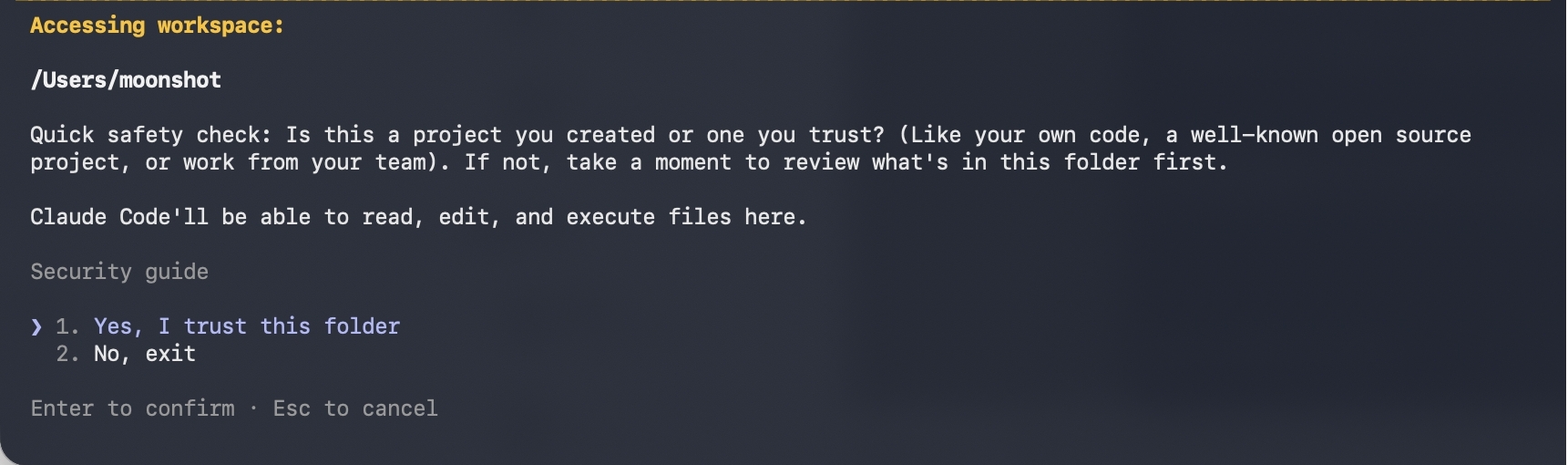
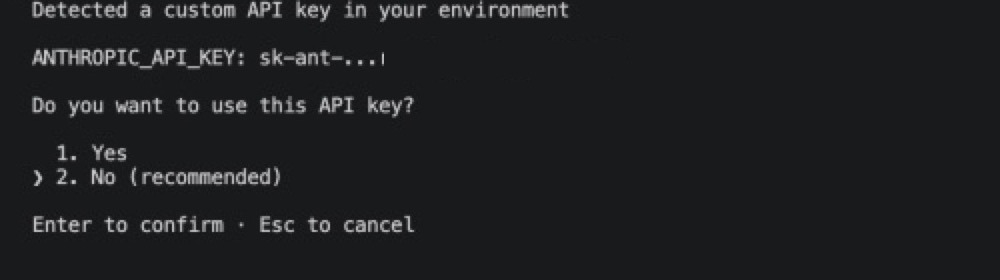
If prompted whether to use this API key, confirm to proceed. Afterwards, follow the prompts to select your trusted project folder to complete the authorization.
│
④ Verify After Starting
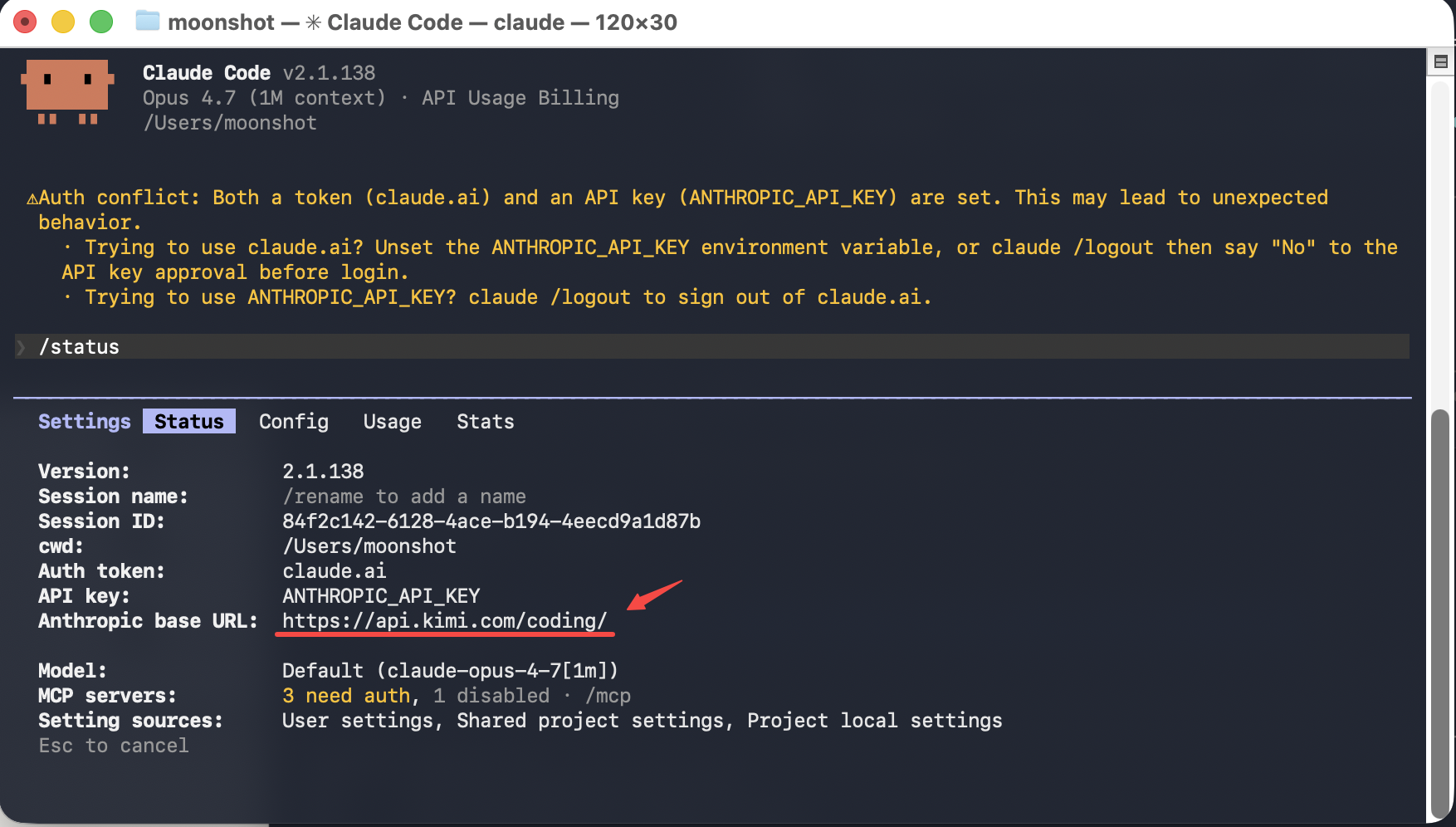
After starting, enter /status. If the returned information shows Base URL as https://api.kimi.ai/coding/, the configuration is successful. Even if the model name still appears as a Claude model, the actual calls are still made to the Kimi Code API.
│
Using the VS Code Extension
The extension ships with its own Claude Code binary and shares the config files under ~/.claude with the CLI. Follow these steps:
Complete the API setup in Configuration above.
Open the extension and start a new session. When the login page appears, click Run
claudein terminal at the bottom: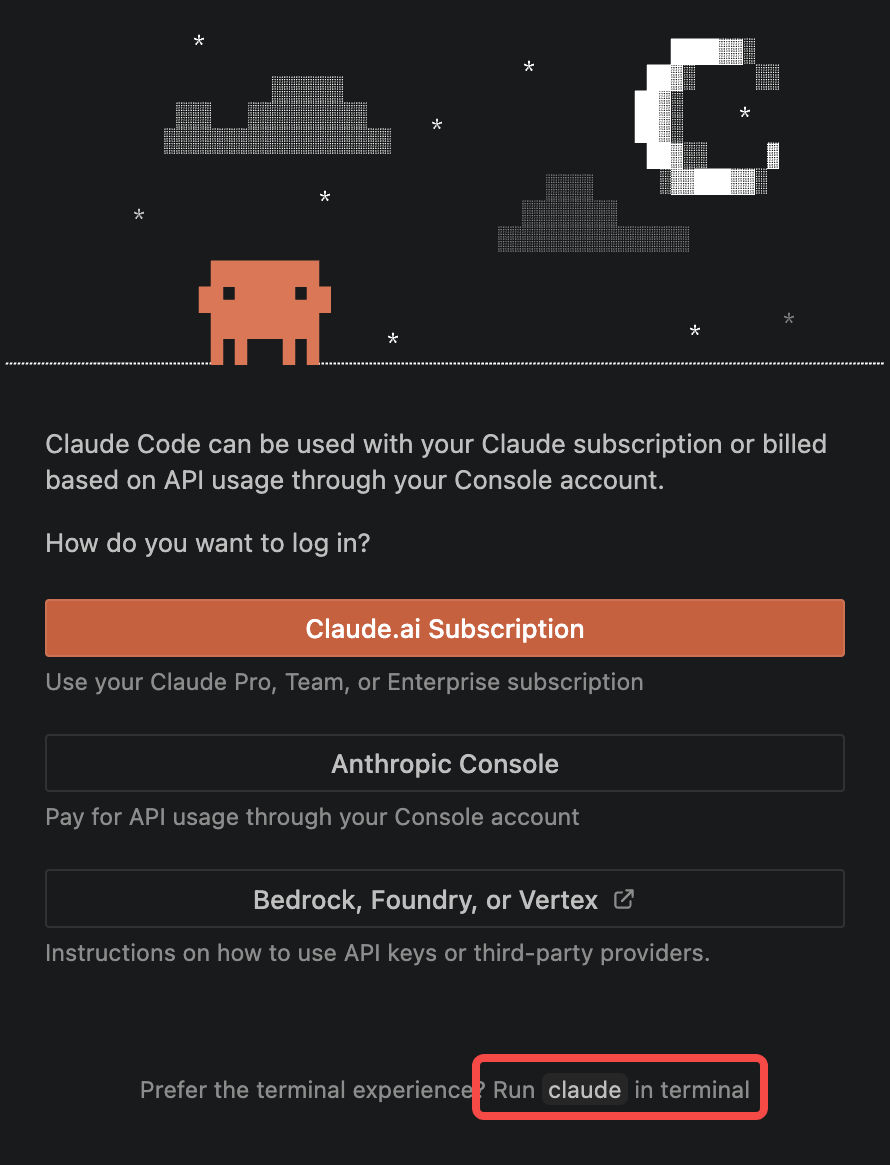
In the terminal that opens, complete two confirmations: choose Yes, I trust this folder for the workspace, then 1. Yes to confirm your API key:
Quit VS Code completely (
Cmd+Qon macOS) and reopen it — the extension is ready to use.
Without this terminal confirmation, the extension lacks the API key confirmation record and the login page pops up repeatedly when you send a message.
FAQ
Changes to the configuration don't take effect
Check whether ~/.claude/settings.json has leftover entries under env (they override terminal environment variables) — you can run the cleanup script from Step ②. Also note that variables exported in a terminal only apply to that session and must be set again after opening a new terminal; if you wrote to settings.json, make sure you restarted Claude Code after editing.
401 authentication error
Check whether ANTHROPIC_API_KEY is a valid Kimi Code API Key — note that the full key is only shown once at creation time.
Model not found
Check the spelling of each model variable (e.g. k3-256k, k3[1m]), and make sure there are no extra spaces or quotes.
Background tasks or sub-agents fail
Usually ANTHROPIC_DEFAULT_HAIKU_MODEL, ANTHROPIC_DEFAULT_FABLE_MODEL, or CLAUDE_CODE_SUBAGENT_MODEL is not configured — the corresponding scenario requested a model name the Kimi Code endpoint does not recognize. See the Configuration Reference and fill in the missing entries.
The VS Code extension keeps showing the login page
The extension is missing the API key confirmation record. Click Run claude in terminal at the bottom of the login page, complete the trust-folder and API key confirmations in the terminal, then quit VS Code completely (Cmd+Q on macOS) and reopen. See Using the VS Code Extension.